
The contractors don't select accounting software for their construction needs. They pick it for the business functions: invoicing, payments, and a clean tax return. Xero handles it well enough for the first few jobs. It fails when a builder is managing five projects, a client is withholding retention, and the kitchen renovation that finished last month doesn't show a profit.
There are requirements specific to accounting for the construction that generic accounting software wasn't built for. Tracking costs by jobs and cost codes, invoicing by the progress of work, and recording retention as a liability on both sides of the balance sheet. Jobs with work in progress need to be valued, and certified payrolls for government contracts.
Xero is a great general ledger for a construction business. It isn't a construction management accounting software per se. Whether it's good enough depends on the level of detail required in managing your jobs and pairing it with the right construction management software.
The construction problem I see most on Xero is a contractor who looks profitable overall and has no idea which jobs are losing money. Materials, labour, and subcontractor bills all land in general expense accounts, so the P&L shows a healthy margin while two or three projects quietly run over budget.
When that business finally sets up job costing, the losses were always there. They were just averaged away across the good jobs. If you run more than a couple of projects at a time, get costs tagged to jobs from the first bill, not after year-end.
Ankit Sagatani, MBA, B.Com · LinkedInWhat Construction Accounting Requires
| Construction-Specific Requirement | Accounting Complexity |
|---|---|
| Job Costing | Track every cost (labour, materials, subcontractors, equipment) against a specific project or cost code, essential for profitability analysis per project |
| Progress Billing (AIA-style) | Bill clients based on percentage completion of the project, requires matching billing to project milestones |
| Retention Accounting | Withhold 5 to 10% of payments from subcontractors; clients withhold from you, both must be tracked as separate liabilities/assets |
| WIP (Work-in-Progress) Accounting | Calculate the value of partially completed projects for balance sheet and revenue recognition, required for GAAP compliance on larger projects |
| Certified Payroll | Davis-Bacon Act requirements for government-funded projects, prevailing wage tracking and payroll reports |
| Subcontractor Management | Track subcontractor insurance certificates, lien waivers, and payment schedules |
| Equipment Tracking | Allocate equipment depreciation and operating costs to specific jobs |
What Xero Handles Natively in Construction
- General accounting, GL, bank reconciliation, accounts payable, accounts receivable
- Invoicing, progress invoices can be created manually in Xero; no native percentage-completion automation
- Bills, supplier and subcontractor bills with payment tracking
- Basic reporting, P&L, Balance Sheet, Cash Flow for the business overall
- Bank feeds, automatic transaction import from bank accounts
- Project tracking (Established plan), basic project cost and time tracking; NOT the same as full job costing
Where Xero Falls Short for Construction, and the Fix.
| Gap in Xero | Integration Solution |
|---|---|
| Job costing with cost codes | Buildxact, Buildertrend, or Procore, these integrate with Xero and push job-costed actuals |
| Progress billing automation | Buildxact or ServiceM8 generate AIA-style progress claims that sync to Xero invoices |
| Retention tracking | Manual workaround in Xero possible (retention liability account); dedicated construction software handles it automatically |
| WIP accounting | Requires manual journal entries in Xero or a construction-specific module |
| Certified payroll | Requires specialist payroll software (e.g. Paylocity, ADP) that produces certified payroll reports; Gusto does NOT natively support Davis-Bacon |
| Equipment cost allocation | Manual tracking in Xero; no native equipment management module |
Xero vs Purpose-Built Construction Accounting Software
| Software | Best For |
|---|---|
| Xero + Buildxact/Buildertrend | Small builders and renovators wanting cloud accounting + job costing without a full construction ERP |
| Xero + Procore | Mid-market contractors needing Procore's project management with Xero for accounting |
| Foundation Software | Dedicated construction accounting ERP; better for larger contractors (50+ employees) |
| Sage 300 CRE (formerly Timberline) | Enterprise-level construction, full job costing, payroll, WIP, equipment; significant implementation cost |
| Viewpoint Vista / Spectrum | Large general contractors and subcontractors; full ERP with certified payroll |
Verdict: Is Xero Good for Construction?
For very small construction businesses (sole trader builder, 1 to 3 projects at a time, simple subcontractor relationships): Xero with manual job-tracking and the Projects module can work adequately with discipline.
For growing construction businesses (multiple projects, subcontractors, retention, progress billing): Xero needs a construction-specific integration (Buildxact or Buildertrend). Without one, job costing and WIP accounting will fall behind.
For mid-to-large contractors (government projects, certified payroll, complex multi-site operations): a dedicated construction ERP (Foundation, Sage 300 CRE, Viewpoint) is a better fit than Xero with multiple integrations.
We were using Xero for our construction business, but we didn't have a proper job-costing integration, so we couldn't see the true profitability of individual projects and our work-in-progress balance was consistently off. Profitjets connected Xero with our job-costing system, mapped the project and cost codes correctly, and gave us a much clearer view of project margins and WIP.
Profitjets supports approximately 20 construction clients using Xero, with around 70% using a dedicated construction or job-costing integration. The most common issue identified before integration is project costs not being mapped correctly to jobs, making project profitability and WIP reporting unreliable.
Reading a Job Cost Report Properly
A job cost report is only useful if the costs reaching it are complete. In construction the incomplete ones are predictable: labour burden left in an overhead account, plant and equipment time never allocated, materials bought on a card and coded to a general supplies line, and subcontractor invoices that arrive a month after the work.
The result is a job that looks profitable while it runs and disappointing when it closes. The fix is less about software than about a rule for each cost type, applied at the point of entry.
- Allocate labour at a burdened rate, including employment taxes and insurance, rather than at bare wage cost
- Accrue subcontractor work that has been done but not yet invoiced, or the job margin will be wrong in every month except the last
- Code materials to the job at the point of purchase, since nobody reconstructs this accurately later
- Give equipment an internal charge rate so jobs carry their share of the cost of owning it
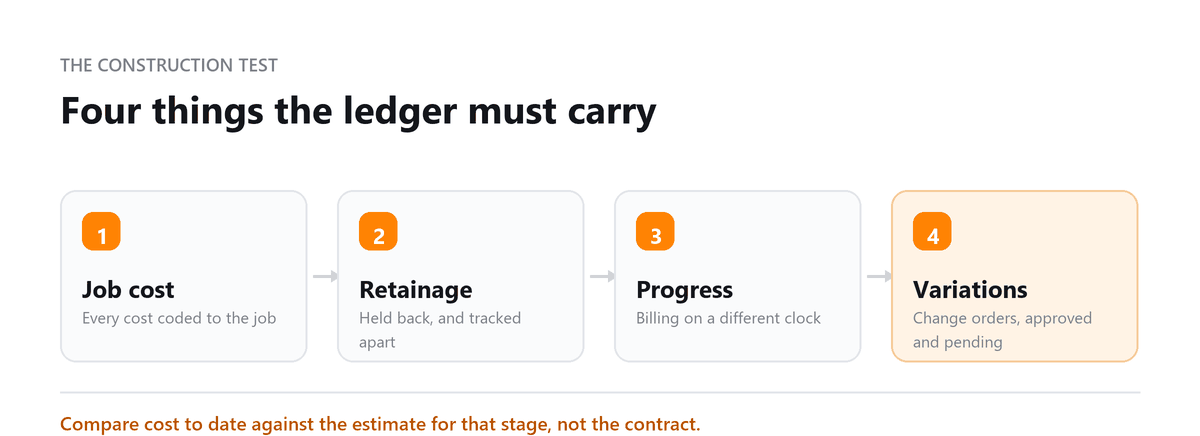
Compare cost to date against the estimate for the same stage of work rather than against the total contract value. That comparison is the one that gives you time to act.
Retainage and Progress Billing in Practice
Two features of construction contracts cause more accounting confusion than anything else. Progress billing means revenue and cash arrive on different schedules from the work. Retainage means an agreed portion of what you have earned is deliberately withheld, sometimes for a long time after the job finishes.
Retainage receivable is genuinely owed to you and belongs on the balance sheet, but it should sit apart from ordinary receivables. Mixed into the normal ageing it makes your collections look terrible and hides the real position, because a retention balance is not a late payment. The same applies in reverse to retainage you hold back from subcontractors.
Where a ledger cannot track retention separately, the usual workaround is a dedicated account plus a supporting schedule by job and contract. That is workable, but the schedule has to be maintained monthly, not reconstructed at year end, or the balance becomes an unexplained figure nobody wants to touch.
When to Move Off a General Ledger Package
General accounting software handles construction adequately up to a point, and the point is more about contract complexity than company size. A contractor running a handful of jobs with simple billing can work comfortably for years. The signals that it is time to look at a purpose-built package are specific.
- Certified payroll or prevailing wage reporting is required regularly, and it is being produced by hand each time
- Change orders are frequent enough that tracking approved and pending variations outside the system has become its own job
- Work in progress schedules with percentage of completion are needed for a lender or a bonding company
- Compliance tracking for subcontractor insurance and lien waivers has outgrown a spreadsheet
Where only one of these applies, an integration usually costs less than a platform change and does the job. Where three or four apply, the workarounds have become the system, and that is the moment to move.
Book a free consultation and we will get your job costing right.
FAQs
Does Xero have job costing for construction?
Xero has basic project tracking on some plans, which records time and costs by project. It doesn't include cost codes, cost-to-complete tracking, or automatic WIP reporting. Most contractors who need proper job costing connect Xero to a construction management tool.
How do I track retention in Xero?
Set up separate accounts for retention receivable, meaning amounts clients are holding back from you, and retention payable, meaning amounts you're holding back from subcontractors. Record retention on each progress invoice and subcontractor bill, and review the balances by job every month. Construction software can track this by contract automatically.
What is WIP reporting, and do small contractors need it?
A WIP report compares each job's costs, billings, and percentage complete to show whether you've billed ahead of or behind the work. Lenders and bonding companies often ask for one. Even without that pressure, it's the clearest way to see whether open jobs are actually profitable.
Can Xero handle certified payroll?
Not directly. Xero doesn't run US payroll, and certified payroll needs prevailing wage tracking and specific reports. Contractors on government jobs typically use a payroll provider that produces certified payroll reports and sync the payroll entries to Xero.
What accounting software do construction companies use?
Small builders often use Xero or QuickBooks Online with a construction tool connected. Mid-sized and larger contractors more often move to software built for construction, such as Foundation, Sage's construction products, or Trimble Viewpoint. The right choice depends on project size, crew size, and whether you do government or bonded work.

Written by
Ankit Sagatani, MBA, B.Com
Ankit works with business owners across the US on industry-specific bookkeeping, from real estate to construction and retail. He writes about what each trade's books actually need. Connect on LinkedIn Connect on LinkedIn
Free consultation
Running Jobs Through Xero?
Book a free consultation and we will get your job costing right.