
Many of small businesses continue to account in almost the same way as they did ten or even twenty years ago. A drawer full of paper receipts, spreadsheet spreadsheets with invoices, printed and scanned bank statements, and the bookkeeper who goes through the chaos at the beginning of each month to close the previous one.
The numbers get there in the end, but they always come late, while cash is already spent, and a single torn receipt is enough to stop the entire closing.
Modern digital accounting automates most of these tedious and error-prone manual processes. With synchronization of bank accounts, scans of receipts on a smartphone camera, invoicing, payments, and accounting software in the cloud, the preparation of financial reports and information becomes more transparent, timely, and accessible to both owner-managers and external experts.
Accounting standards remain the same, but the way of working with numbers and documents becomes more efficient and integrated.
Expert Perspective
This guide covers what digital accounting is, how accounting evolved from paper ledgers to cloud systems, the tools involved, the main benefits and limitations, why businesses are making the switch, and how to move to digital accounting smoothly.
I still see businesses running their finances in spreadsheets in 2026. The cost of manual accounting is not the spreadsheet, it's the 5 hours a week of data entry, the errors that only surface at tax time, and the decisions that were made without current information. Digital accounting pays for itself in the first month.
Ankit Sagatani, MBA, B.Com · LinkedInWhat is Digital Accounting?
Digital accounting is the practice of managing financial records electronically, eliminating paper-based ledgers and manual data entry. It uses computerized systems and cloud-based tools to capture transactions automatically, categorize expenses, and generate financial reports in real time. The defining characteristic of digital accounting is automation: rather than manually recording each transaction, the system pulls data from connected bank accounts, payment processors, and billing platforms reducing the human effort required to maintain accurate books.
How Does Digital Accounting Work?
The workflow is largely automated: accounting software connects to bank accounts and payment systems via secure API feeds, transactions are imported automatically as they occur; rules-based categorization (supplemented by machine learning) assigns each transaction to the correct account; real-time financial reports are generated continuously as new data flows in; and all data is backed up automatically to cloud servers with no manual intervention required. The accountant's role shifts from data entry to review, analysis, and interpretation.
Manual Accounting vs Digital Accounting
| Factor | Manual Accounting | Digital Accounting |
|---|---|---|
| Speed | Slow, days to weeks for reports | Real-time, instant reporting |
| Error rate | High, human data entry | Low, automated feeds |
| Accessibility | Physical ledgers, one location | Any device, anywhere |
| Cost | Low upfront, high in labour | Subscription cost, low labour |
| Backup | Physical copies, fire/flood risk | Automatic cloud backup |
| Audit trail | Manual, incomplete | Complete, timestamped, searchable |
Transition of Digital Accounting
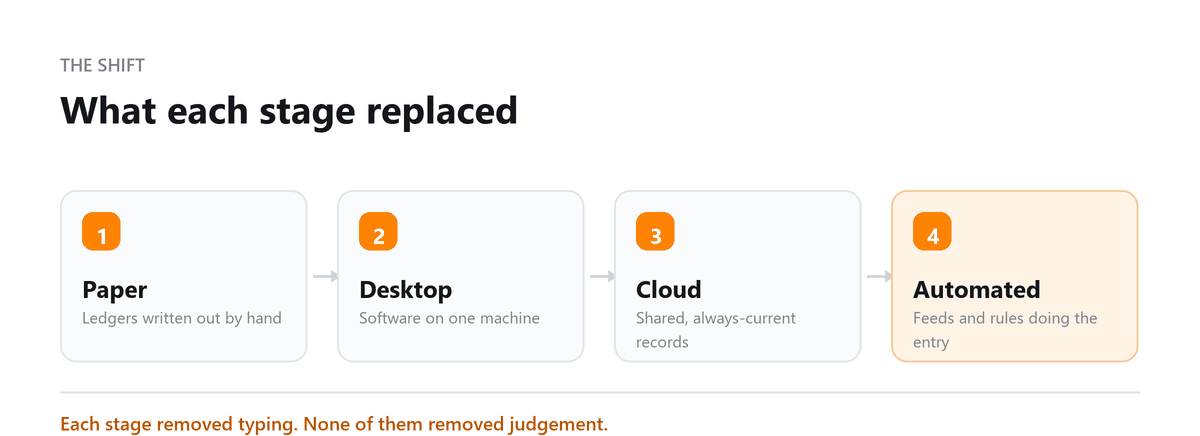
The evolution of accounting from paper to digital spans seven decades: in the 1950s, computers were first introduced to business accounting tasks, primarily for large corporations; in the 1980s, personal computer accounting software (Peachtree, early QuickBooks) brought digital record-keeping to small businesses; in the 2000s, cloud computing began enabling remote access to financial data for the first time; in the 2010s, mobile apps and bank APIs automated data capture, dramatically reducing manual entry; and in the 2020s, AI-driven categorization, automated reconciliation, and predictive cash flow analytics are transforming accounting from a record-keeping function into a real-time financial intelligence system.
Benefits of Digital Accounting
- Reduced manual workload: automating data entry, categorization, and reconciliation frees accounting staff for higher-value analysis.
- Improved accuracy: automated bank feeds and matching rules eliminate the human errors that are inevitable in manual entry.
- Scalability: digital systems handle growing transaction volumes without proportional increases in accounting headcount.
- Enhanced security: bank-level encryption, multi-factor authentication, and automatic backups protect financial data far more reliably than paper records or local servers.
- Mobile accessibility: manage invoicing, expense approval, and financial reporting from any device, anywhere.
- Real-time insights: live dashboards and instant reports replace the days-long wait for month-end reports.
- Seamless integrations: connect payroll, invoicing, CRM, e-commerce, and payment processing into one unified financial ecosystem.
Reasons to Do Digital Accounting
- Financial closes are markedly faster than manual accounting processes.
- Live cash flow visibility enables proactive financial management rather than reactive scrambling.
- Bank-level data security is standard, not an expensive add-on.
- Mobile dashboard access means decisions can be made with current data, not week-old reports.
- Advanced forecasting analytics help predict cash needs before they become crises.
- Reduced year-end tax scramble: records are already categorized and reconciled when tax season arrives.
Why Every Company Needs Digital Accounting
Digital accounting is no longer a competitive advantage, it is a competitive necessity. Suppliers, customers, and banks increasingly expect digital financial interactions: e-invoicing, electronic payments, online statements. Remote and hybrid work has made physical ledgers functionally obsolete.
Regulatory reporting in many jurisdictions now requires digital submissions. And the companies that still rely on spreadsheets and manual bookkeeping are paying for it in wasted hours, preventable errors, and decisions made on stale data. The transition cost of moving to digital accounting is real but it is a one-time cost. The cost of staying in manual compounds every month.
How To Get Started With Digital Accounting
The practical steps: choose accounting software that matches your business size and industry (see table below) decide whether to migrate historical data or start fresh from a clean reconciled date; connect your bank accounts and payment processors via secure bank feeds; train your team on the new workflows and categorization rules; and establish a monthly close routine: reconcile accounts, review reports, and address discrepancies, so the system stays accurate over time.
Best Digital Accounting Software
| Software | Users | Key Strength |
|---|---|---|
| QuickBooks Online | Millions of businesses globally | Ecosystem, payroll integration |
| Xero | Multi-user, growing teams | 1,000+ app integrations, clean UI |
| Sage Intacct | Mid-market, multi-entity | Advanced reporting, GAAP compliance |
How Profitjets Helps with Digital Accounting
Profitjets sets up and manages digital accounting systems for businesses at every stage, from first-time migrations off spreadsheets to complex multi-entity cloud environments. We select the right platform, configure it correctly, manage ongoing bookkeeping, and deliver monthly financial reports that give management the real-time visibility they need to run the
More than 500 businesses trust Profitjets, with the team supporting cloud-based accounting platforms including QuickBooks, Xero, NetSuite, and Zoho Books and integrating financial tools to reduce manual accounting work.
We helped a client move from manual spreadsheets and paper-based records to a digital accounting system, connecting their bank feeds and financial tools and restructuring their chart of accounts. Once the transition was complete, the client had more up-to-date financial records and spent far less time manually entering and reconciling transactions.
Conclusion
Digital accounting is the foundation of modern financial management. The combination of automated data capture, real-time reporting, cloud accessibility, and integrated security makes it the only practical choice for any business that wants accurate financial data and the ability to act on it quickly. The transition from manual to digital is a one-time investment that pays ongoing dividends in accuracy, efficiency, and visibility.
Book a free consultation and we will configure the feeds and the rules.
Frequently Asked Questions
Is digital accounting the same as cloud accounting?
They overlap significantly but are not identical. Digital accounting is the broader category, any computerized financial management including desktop software. Cloud accounting is a subset: digital accounting where data is stored and processed on remote servers, accessible via the internet. All cloud accounting is digital; not all digital accounting is cloud-based.
What data security measures do digital accounting platforms use?
Leading platforms use 256-bit AES encryption for data at rest and in transit, multi-factor authentication for logins, role-based access controls, continuous automatic backups, and SOC 2 Type II compliance certifications. Xero publishes its security practices and undergoes independent audit.
How does digital accounting help at tax time?
Digital accounting maintains categorized, reconciled records year-round. At tax time, you have an organized expense ledger, reconciled bank accounts, profit and loss statements, and supporting documentation, all exportable to your CPA. The scramble to reconstruct a year of transactions from bank statements simply does not happen.
Can digital accounting handle multiple currencies?
Most modern platforms (Xero, QuickBooks Online, NetSuite) support multi-currency accounting with live exchange rate feeds, automatic conversion, and foreign currency revaluation. Some entry-level plans restrict multi-currency to higher tiers, check your plan before assuming it is available.
What is the biggest mistake businesses make when adopting digital accounting?
Migrating without cleaning up existing data. Importing years of incorrectly categorized transactions or mismatched balances just automates the chaos. The best approach: start clean on a reconciled date, import only a summary of historical balances, and build accurate records forward from there.

Written by
Ankit Sagatani, MBA, B.Com
Ankit works with business owners across the US on industry-specific bookkeeping, from real estate to construction and retail. He writes about what each trade's books actually need. Connect on LinkedIn Connect on LinkedIn
Free consultation
Want the Automation Set Up Right?
Book a free consultation and we will configure the feeds and the rules.