
A majority of small businesses process invoices in 3 mediums that have nothing to do with accounts payable: email, spreadsheet programs, or accounting software that doesn’t have approval routing. It can go on for years without issue before suddenly one business’s volume simply crosses an invisible threshold and suddenly one calls their supplier asking why they just received two payments and none of their invoices are being paid.
AP software is designed to address exactly this scenario, serving to capture and route the invoice, identify duplicates, make the payment itself, and post back to the ledger without additional manual entries.
The real question is not whether it works, but whether the volume of invoicing and the cost of errors it incurs justify the expense, which for most small businesses that this article is targeting the answer is probably not.
The purpose of this article is to provide an overview of the considerations for making such a purchase, what options exist on the market, how to spot the warning signs that it may be right for you, and methods of improving your accounts payable process without a significant financial investment.
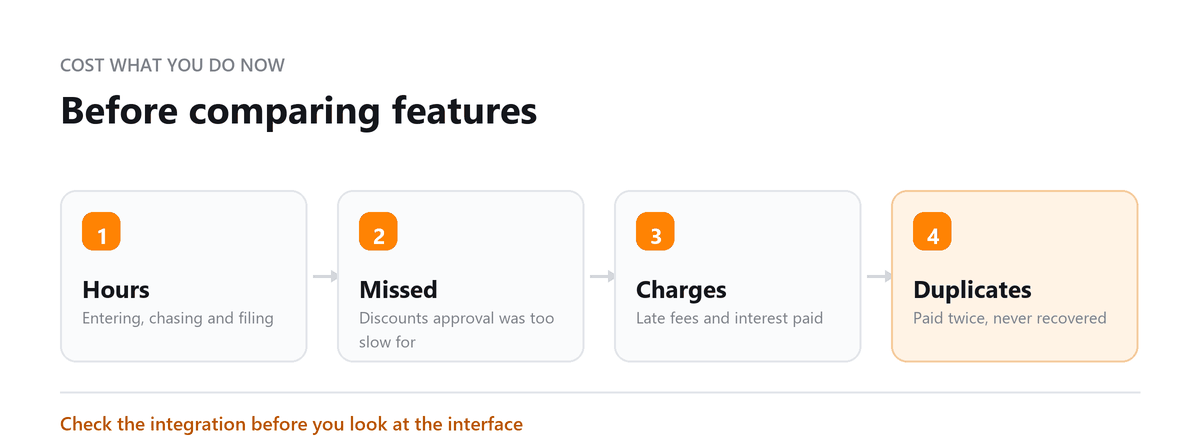
The moment it becomes obvious is almost never the efficiency case. It's a specific event like a missed discount on a large invoice and the owner works out that one event cost more than a year of the subscription. What they usually haven't worked out is that the same event has probably happened before and nobody caught it. That's the real number, and it only surfaces once something is watching.
Ankit Sagatani, MBA, B.Com · LinkedInDo you actually need AP software yet?
Worth answering honestly before looking at products, because plenty of businesses land on pages like this and buy something they'll use at 20% of capacity.
Volume is the usual signal
Somewhere around 20 to 30 invoices a month is where the subscription starts costing less than the time it replaces. Below 20, a disciplined manual process, one monitored inbox, a written approval rule, monthly reconciliation, will perform about as well for nothing. Above 50, the argument is basically closed.
A cost event is the stronger signal
If you've had a duplicate payment, a missed discount on a sizeable invoice, or a supplier put you on hold for late payment, work out what that single event cost. It's frequently more than a year of software, and unlike volume it tells you the failure is already happening.
Exception rate matters more than either
If more than one invoice in twenty needs someone to intervene: wrong amount, unclear coding, unknown vendor: you have a process problem upstream. Software will process those exceptions faster without reducing them. Fix intake and vendor data first, or you'll pay a subscription to do the same work at speed.
Work out your current cost per invoice
before you compare it to anything. Total the hours spent on AP each month, apply a realistic rate, add the cost of errors you know about, divide by invoice count. Most owners have never done this and are surprised by the answer in both directions.
Key Features to Look for in AP Software
Two of these deserve weighting above the rest when you're comparing.
Approval routing with escalation
is the feature that changes behaviour rather than speed. An invoice that automatically moves to someone's manager after 24 hours gets approved; one sitting in an inbox with no deadline doesn't.
Matching, chosen for your spend type
Vendor demos lead with three-way matching because it's impressive and because enterprise buyers need it. If your spend is mostly software, contractors and professional services, there's no goods receipt to match against and three-way capability is irrelevant to you.
What you need is two-way matching against a contract or PO, plus a confirmation step from whoever commissioned the work. Ask specifically how the platform handles service invoices: some handle it well, some treat it as an exception every time, which will wreck your exception rate.
| Feature | Why It Matters |
|---|---|
| Invoice capture (OCR/AI) | Eliminates manual data entry, reads PDFs and images automatically |
| Three-way matching | Matches invoice to PO and goods receipt before routing for approval |
| Approval workflow | Routes invoices to the right approver based on amount and department rules; sends reminders |
| Duplicate detection | Flags invoices with the same vendor/amount/date before payment |
| Accounting integration | Syncs with QuickBooks, Xero, NetSuite, no manual export/import |
| Payment execution | Pays via ACH, wire, or virtual card directly from the AP platform |
| Audit trail | Every action logged with user, timestamp, and amount |
| Supplier portal | Suppliers submit invoices directly, no email chasing |
Top AP Software Solutions for Small Businesses in 2026
| Tool | Best For | Key Features |
|---|---|---|
| BILL (formerly Bill.com) | SMBs wanting integrated AP + AR + payments | Approval workflows, ACH/check payments, QuickBooks/Xero sync |
| Tipalti | Mid-market businesses with global suppliers | Mass payments, tax compliance (W-9/W-8), multi-currency |
| Stampli | Teams wanting AI-powered approval and collaboration | AI invoice processing, communication hub per invoice, ERP integrations |
| Dext Prepare | QuickBooks/Xero users wanting receipt and invoice capture | Mobile capture, auto-coding, direct sync to accounting platform |
| QuickBooks AP (native) | Businesses already on QBO wanting simple AP | Basic approval, bill entry, payment scheduling, no advanced workflow |
On pricing: entry-level capture tools start low, but anything with genuine approval routing, escalation and payment execution costs meaningfully more, and per-user pricing changes the maths once several people approve. Get a quote at your actual user count rather than working from the headline price.
Run a trial with your own messy invoices rather than clean samples. Exception handling and routing only reveal their limits on real data, and a platform that looks excellent on a demo invoice can generate an exception on every service bill you receive.
AP Software with Outsourced Bookkeeping Services
The two solve different halves of the problem, which is why they work well together.
The platform handles intake, capture, matching and approval routing, the mechanical work that happens as invoices arrive. Your bookkeeping team handles GL coding decisions, month-end reconciliation against supplier statements, aged AP review, and the reporting that tells you what's actually outstanding.
That split also solves something small businesses struggle with structurally: segregation of duties. When approval sits with you and processing sits with an external team, you get a control that normally requires enough staff to separate the roles internally.
It only works with communication discipline. Your provider knows about a new vendor, a cancelled service, or a change in approval authority when someone tells them, and this is where the arrangement most often falls down.
If you're weighing AP software against outsourced AP, Profitjets can look at your current invoice volume, exception rate and cost per invoice and tell you which one fits including when the answer is neither yet
Book a free consultation and we will cost your current process.
Frequently Asked Questions
At what point does a small business need AP software?
Around 30 invoices a month is the common threshold, but the more reliable trigger is a cost event: one duplicate payment, one missed discount on a large invoice, or one supplier putting your account on hold. Work out what that single event cost and compare it to a year of subscription. It's usually not close.
Can AP software integrate with QuickBooks?
Yes. BILL, Stampli, Tipalti and Dext all connect to QuickBooks Online, and most support Desktop as well. Approved invoices and payments sync across so nothing gets entered twice. Confirm the direction and depth of sync during a trial though, some integrations push payments but not the full coding detail, which leaves your bookkeeper doing work you thought you'd automated.
How much does AP software cost for a small business?
It ranges widely depending on whether you need capture only or full approval routing and payment execution, and most platforms price per user, so the number moves once several people approve invoices. Get a quote at your real user count.
Will AP software eliminate duplicate payments?
It catches most of them: same vendor, same amount, same date gets flagged before payment. What it won't catch is the same supplier existing twice in your vendor master under slightly different names, because as far as the system is concerned those are two different companies. Clean the vendor list before you rely on duplicate detection.
Do I still need a bookkeeper if I have AP software?
Yes, and the work changes rather than disappearing. Software handles capture, routing and payment. Someone still has to decide GL coding on anything ambiguous, reconcile against supplier statements, investigate aged items, and review recurring payments for services nobody uses any more. That last one is consistently the largest recoverable number in an AP review and no platform finds it.

Written by
Ankit Sagatani, MBA, B.Com
Ankit works with business owners across the US on industry-specific bookkeeping, from real estate to construction and retail. He writes about what each trade's books actually need. Connect on LinkedIn Connect on LinkedIn
Free consultation
Weighing Up AP Software?
Book a free consultation and we will cost your current process.