
The first sign that their books are wrong ecommerce sellers see is a discrepancy between the math and the dashboard. Shopify is reporting that their store received $80,000 last month. QuickBooks shows $61,000 in deposits. The payout from Amazon doesn't reflect either the figures or the dashboard. Assuming the differential is composed of fees and recording the deposits as revenues understates sales, hides expenses and refunds and buries channel specific margins.
The reason for this is not only, do marketplaces and payment processors not pay you what they owe you, they pay you less than they owe you in a single, aggregated sweep for everything from fees and refunds to advertising spend, order fulfilment, reserves and sales taxes that they may have collected on your behalf.
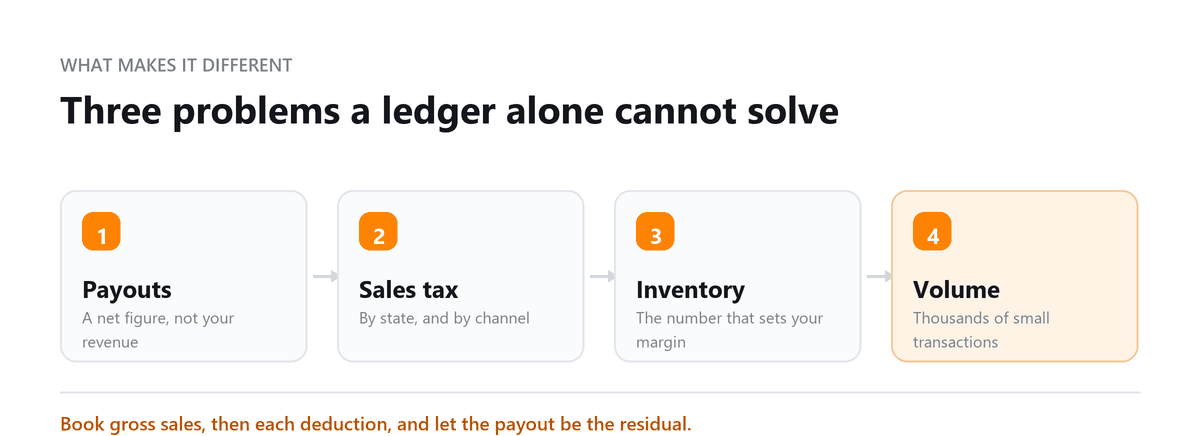
The remedy is to parse out all the line items in your payouts. Gross revenue, fees, refunds, shipping costs, taxes due, inventory costs and anything else that reduces your income from sales should be recorded as separate line items reducing your revenues.
For most sellers that means connecting QuickBooks Online or Xero with an ecommerce accounting integration and adding inventory or order management software as their business grows.
The ecommerce mistake that distorts profitability most is recording marketplace payouts as sales. An Amazon deposit of $40,000 goes into the books as $40,000 of revenue, when the real picture might be $58,000 in sales, $12,000 in fees, $4,000 in refunds, and $2,000 in advertising.
Revenue looks smaller than it is, costs look smaller than they are, and the margin looks fine right up until a price change or ad increase tips a product into a loss nobody can see. Settlement-level reconciliation fixes it, and it's the first thing we set up for any ecommerce client.
Ankit Sagatani, MBA, B.Com · LinkedInWhat Makes Ecommerce Accounting Different?
| Challenge | Why It Matters |
|---|---|
| Multi-channel sales | Sales from Shopify, Amazon, Etsy, and WooCommerce must be reconciled separately, payouts to bank ≠ gross revenue (fees deducted) |
| Marketplace fee reconciliation | Amazon's Seller Central remittances include numerous fee types (FBA fees, referral fees, ads, refunds), reconciling to gross sales requires dedicated tools |
| Inventory costing | FIFO or AVCO costing across multiple SKUs and warehouses, general accounting software often lacks multi-location inventory |
| Sales tax | Nexus rules mean ecommerce businesses with nationwide sales have complex state sales tax obligations, Avalara or TaxJar integration typically required |
| High transaction volume | Hundreds or thousands of daily transactions overwhelm manual entry; bank feeds alone don't provide the detail needed |
| Returns and refunds | Partial refunds, restock fees, and marketplace-managed returns must be reconciled accurately to avoid revenue overstatement |
5 Top Ecommerce Accounting Software Picks
The differences that matter aren't on the feature comparison page, they're in how the tool handles multi-channel sales, whether it tracks inventory at a level your accountant can actually use, and what happens when sales tax nexus changes mid-year. We've picked five for 2026 based on what breaks in practice for stores doing real volume, not on which has the longest feature list.
1. QuickBooks Online with A2X
A2X connects to Shopify, Amazon, and other channels and turns each settlement into a summarised journal entry in QuickBooks Online. Each entry splits the payout into sales, fees, refunds, taxes, and other charges and matches the actual bank deposit. This setup suits sellers who want accurate books without every order cluttering the ledger. Pricing depends on the channel and order volume.
2. Xero with A2X
The same A2X reconciliation, using Xero as the ledger. It's a strong fit for sellers who want several people in the books, work with an outsourced accounting team, or sell in more than one currency. The setup and settlement logic work the same way as with QuickBooks.
3. QuickBooks Online or Xero with Synder
Synder syncs sales data from Shopify, Stripe, PayPal, Amazon, and other platforms into your accounting software. It can post summarised entries or bring in transactions in more detail, depending on your setup. It suits sellers who take payments across several processors or want more order-level detail in their books.
4. Extensiv Order Manager
Extensiv Order Manager, formerly Skubana, is a multi-channel order and inventory management platform, not an accounting system. It routes orders, manages inventory across warehouses, and supports purchasing for higher-volume sellers. The accounting data then flows into your ledger. It suits brands whose inventory and fulfilment have outgrown what their accounting software can track.
5. Linnworks
Linnworks manages inventory, orders, and listings across marketplaces and web stores, and connects to accounting software. Like Extensiv, it sits alongside the ledger instead of replacing it. It suits sellers who list the same products on several channels and need stock levels kept in sync.
Sellers focused on Amazon may also look at Veeqo, Amazon's shipping and inventory tool, for fulfilment. Accounting reconciliation is still needed alongside it.
Tools That Are No Longer Active or Have Changed Significantly
| Tool Listed | Current Status | Action Required |
|---|---|---|
| Ecomdash | Ecomdash was discontinued by ChannelAdvisor in 2022. It is no longer available. | Remove from article entirely; replace with Linnworks or Extensiv. |
| Veeqo | Veeqo was acquired by Amazon in 2021 and is now free for Amazon sellers (using Amazon-connected features). The live page lists '£199/month', this is incorrect. | Update to note Veeqo is now free for Amazon sellers; verify current pricing and feature set at veeqo.com |
| '10 Best Upcoming ecommerce Accounting Software in 2024' (H2 text) | The H2 contains '2024' date, 'Upcoming' implies a forward-looking list (but the article is a current review), and the live page has H1 saying '2025' alongside H2 saying '2024', inconsistent. | Update H2 to 'Best Ecommerce Accounting Software in 2026'; remove 'Upcoming' framing. |
How to Choose Ecommerce Accounting Software
| Your Situation | Recommended Setup |
|---|---|
| Shopify-only seller, fewer than 200 orders/month | QBO + A2X (Shopify plan) or Xero + A2X; TaxJar for sales tax |
| Amazon FBA seller | QBO + A2X (Amazon plan); Helium10 or Jungle Scout for product research; Avalara for multi-state tax |
| Multi-channel seller (3+ platforms, 500+ orders/month) | QBO or Xero + A2X + Extensiv or Linnworks for inventory/order management |
| Ecommerce brand with significant inventory (retail value $500k+) | NetSuite or Brightpearl with native ecommerce integrations; beyond QBO's inventory capabilities |
| UK-based ecommerce business | Xero (stronger UK base) + A2X + Avalara or Taxamo for EU VAT |
Setting Up Ecommerce Books Correctly
Start with the chart of accounts. Set up sales, fees, refunds, advertising, and shipping accounts by channel, so each marketplace's profitability is visible from the first month. Connect a settlement integration before historical payouts pile up, and reconcile each settlement against the actual bank deposit.
Then get inventory right. Cost of goods sold is only accurate if purchases, landed costs, and inventory counts are recorded consistently. Run a quarterly check on where you have sales tax nexus, too, because marketplace collection doesn't cover sales through your own website.
We were recording marketplace payouts as revenue, so the deposits looked right but we couldn't see the fees and other deductions being taken before the money reached our bank. That made our margins look better than they really were and left us with a sales-tax reconciliation issue at year-end. After Profitjets set up settlement reconciliation, we could match marketplace sales, fees, refunds, and payouts properly and see our actual margins.
Profitjets supports approximately 35 ecommerce businesses, with Amazon, Shopify, and QuickBooks Online among the most common platform combinations. The most frequent cleanup issue is marketplace payouts being recorded as net revenue instead of reconciling gross sales, fees, refunds, and other settlement adjustments separately.
Book a free consultation and we will untangle your payouts and tax.
FAQs
Can QuickBooks Online handle ecommerce accounting?
Yes, as the ledger, but it needs an integration to work properly. On its own, QuickBooks Online sees Amazon or Shopify deposits as single lump sums, with no breakdown of sales, fees, refunds, or taxes. A settlement integration such as A2X or Synder supplies that detail.
Is Skubana still available?
The product continues under a new name. Skubana became Extensiv Order Manager after its parent company rebranded as Extensiv. Anyone looking for Skubana's order and inventory tools will find them under that name.
Do marketplaces handle my sales tax?
Partly. In most states, marketplaces such as Amazon, Etsy, and Walmart collect and remit sales tax on sales made through their platforms. Sales through your own website or Shopify store are generally your responsibility. You may still have registration or filing obligations in states where you have nexus.
Should ecommerce sales be recorded order by order or by settlement?
For most sellers, by settlement. Summarised settlement entries keep the books clean, match bank deposits exactly, and avoid thousands of individual orders in the ledger. Order-level detail can make sense for lower volume or when you need customer-level reporting, but the platform itself usually holds that detail already.
When does an ecommerce business need an ERP?
Usually when inventory spans several warehouses or channels, wholesale and direct-to-consumer sales need to share inventory, or purchasing and landed costs become hard to track in basic accounting software. Most sellers get a long way on QuickBooks Online or Xero with the right integrations before an ERP is worth the cost.

Written by
Ankit Sagatani, MBA, B.Com
Ankit works with business owners across the US on industry-specific bookkeeping, from real estate to construction and retail. He writes about what each trade's books actually need. Connect on LinkedIn Connect on LinkedIn
Free consultation
Selling Across Channels?
Book a free consultation and we will untangle your payouts and tax.