
Accounts payable have a slow decay, nobody sees the process rot, but they see the supplier calling about a twice paid invoice, or the month's bank balance that made no sense to anyone. By the time something gets noticed, it's been happening for a year.
The accounts payable best practices below are in right order, foundational to each other. Each is predicated on the one right before it being implemented. Doing item four before item one is how companies end up with expensive software that makes the same mistakes faster.
Accounts payable is one of the most process-intensive functions in a small business finance team and one of the most error-prone when run manually. These six best practices reduce errors, prevent fraud, accelerate processing, and improve supplier relationships. They are sequenced from foundational to advanced: implement them in order.
Centralising invoice receipt is the one that moves the needle, and it's the least interesting thing on any list like this. When invoices land in four people's inboxes, your duplicate payment rate is whatever chance decides: the supplier resends, two people forward it, both get paid. Fix the intake and half your exception rate disappears before you've bought any software.
Ankit Sagatani, MBA, B.Com · LinkedInWhat is Accounts Payable (AP)?
Accounts payable is what your business owes suppliers for goods and services you've received but haven't yet paid for. It sits on the balance sheet as a current liability.
- AP management is the work around that number: receiving supplier invoices, checking them, routing them for approval, paying within terms, and keeping records clean enough to survive an audit or a tax review.
- The workflow in short form: purchase order → goods or services received → invoice received → invoice coded and matched → approval routed → payment scheduled → payment executed → posted to the ledger. Every arrow in that chain is a place where something can be lost, duplicated, or paid to the wrong account.
Accounts Payable Workflow
A typical AP workflow: purchase order issued → goods/services received → invoice received → invoice coded and matched → approval routed → payment scheduled → payment executed → posted to GL. Each step is a control point where errors, delays, or fraud can occur.
6 Best Practices for Accounts Payable
1. Centralise Invoice Receipt
One monitored channel. A dedicated AP email address or a supplier portal, and nothing else.
Invoices arriving at individual employees' inboxes are the single largest source of AP failure in small businesses not because people are careless, but because an invoice sitting in someone's inbox is invisible to everyone else. It gets forwarded late, or not at all. The supplier chases and resends. Now two copies exist in two places and both get approved by different people.
This is also the prerequisite for everything else on this list. You cannot match, automate, or reconcile a process you can't see the inputs to.
2. Implement a Three-Way Match
For goods, run a three-way match: the purchase order against the goods receipt note against the invoice. Quantity, price and terms all have to agree, and anything that doesn't gets held rather than paid.
Most small business AP isn't goods, though. It's software subscriptions, contractors, professional fees, and services where there's nothing to physically receive. For those, match the invoice to the PO or the contract, and get confirmation from whoever actually commissioned the work that it was delivered. That confirmation is the whole control. Without it, businesses keep paying for services they cancelled months earlier, it's one of the most common things we find in a first review, and it's almost never fraud. It's just that nobody ever told AP.
3. Standardise Approval Workflows
Define clear approval thresholds: which invoices can be approved by a department head, which need finance director sign-off, which need C-suite approval. Document these thresholds in writing and enforce them consistently. Without standard approval rules, invoices wait in approver inboxes indefinitely, the most common cause of late payment penalties and damaged supplier relationships.
| Invoice Amount | Required Approver |
|---|---|
| Under $1,000 | Department head |
| $1,000 to $10,000 | Finance manager |
| $10,000 to $50,000 | CFO or Controller |
| Over $50,000 | CFO + CEO sign-off |
Adapt these thresholds to your business size and risk profile. The example above suits a $2M-$10M revenue business.
4. Automate Data Entry and Coding
Keying vendor names, invoice numbers, amounts and GL codes by hand is slow and it's where miscoding happens. Platforms like BILL, Tipalti, Stampli, or the AP features inside QuickBooks use OCR to pull the data off the invoice and suggest codes based on what you've done before.
Worth being honest about the threshold, because the software vendors aren't. Below roughly 20 invoices a month, a disciplined manual process with a centralised inbox and a spreadsheet will cost you less than the subscription and perform about as well. Between 20 and 30 is the grey zone. Above that, automation pays back inside a quarter or two and the case gets stronger with every additional invoice.
And automation doesn't fix bad inputs. If the vendor master is a mess, OCR will happily code invoices against the wrong duplicate record at speed. Which is why the next one comes before this one in practice, even though it's numbered after it.
5. Maintain a Clean Vendor Master
One record per supplier. A unique vendor ID. A consistent naming convention so the same company can't be entered as "Acme Ltd", "Acme Limited", and "ACME" in three places. Verified bank details on file.
Duplicate vendor records are the root cause of most duplicate payments, far more than any deliberate fraud. The same invoice enters twice under two names and nothing in the system flags it, because as far as the system is concerned these are two different suppliers.
The standard advice is to review the vendor master quarterly, and most small businesses will never do it. A version that actually happens: check any vendor record that hasn't had activity in twelve months at year-end, and verify every new vendor at the point of creation rather than after.
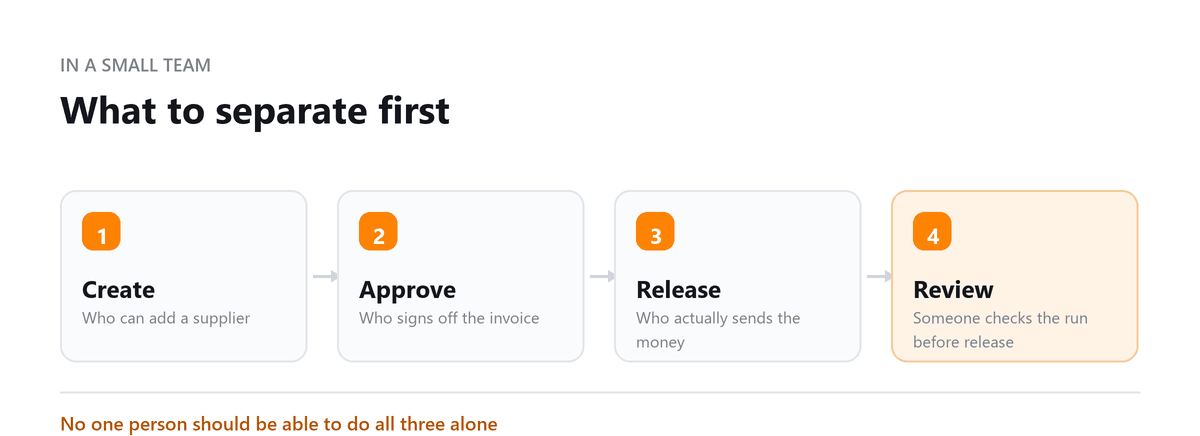
One rule that isn't optional. Any request to change a supplier's bank details gets verified by phone, on a number you already had on file, not the one in the email making the request. Payment redirection fraud is the most expensive thing that happens to small business AP, it arrives looking exactly like routine correspondence, and one phone call stops it.
6. Reconcile AP Sub-Ledger Monthly
At month-end, compare your open invoices against supplier statements. What surfaces is rarely dramatic, a credit note that was issued and never applied, a disputed invoice still sitting open months after it was settled verbally, a liability on the books for something that was cancelled.
None of those are large individually. They compound, and they make the AP figure on your balance sheet wrong, which means every working capital number derived from it is wrong too.
In first-month AP reviews for new clients, Profitjets identifies unreconciled items averaging $5,000 to $10,000, most commonly unapplied credits and unresolved disputes.
Why Automate the Accounts Payable Process
AP automation reduces invoice processing time from 15+ days (manual) to 3-7 days, cuts cost per invoice from $12-$30 to $2-$8, and reduces error rates from 3-5% to under 1%. For small businesses with limited AP headcount, automation allows one person to manage 3-5x the invoice volume they could handle manually.
The number that matters most for a small business isn't any of those. It's capacity. One person running an automated AP function handles three to five times the invoice volume they could manage manually, which means AP stops being the thing that forces your next finance hire.
How to Measure AP KPIs
- Days Payable Outstanding (DPO): AP balance / (COGS / 365), measures how long the business takes to pay suppliers on average. Target: 30-60 days
- Cost per invoice: total AP department cost / invoices processed, target <$5 with automation
- Invoice exception rate: invoices requiring manual intervention / total invoices, target <5%
- On-time payment rate: invoices paid by due date / total invoices, target >95%
Read DPO and on-time payment rate together, never separately. A DPO that's climbing looks like sharp working capital management on a dashboard and can just as easily mean you've started paying late without noticing. The on-time rate tells you which one it is.
Frequently Asked Questions
Book a free consultation and we will review your controls.
Frequently Asked Questions
How many invoices a month justifies AP automation?
Around 20 to 30 a month is where it typically pays for itself within six months. Below 20, a disciplined manual process with centralised invoice receipt will usually cost you less than the subscription. Above 100, the question isn't really open: the manual error rate alone costs more than the platform. Volume isn't the only factor though: if your invoices are complex, multi-line, or arrive in a dozen formats, automation earns its keep at lower volume than the numbers suggest.
What is the risk of not improving AP processes?
Lost early payment discounts are the measurable cost, and they add up faster than most owners expect: 2/10 Net 30 terms are worth roughly 37% annualised. The less measurable costs do more damage: suppliers who deprioritise you on allocation or lead times, weak controls that leave you exposed to duplicate payments and redirection fraud, and AP bottlenecks that tie up working capital you needed for something else.
Contractual late fees exist in some supplier agreements, often at 1.5% a month, but many small business suppliers charge nothing at all and the relationship cost is the real one.
Which of these six should I do first if I can only do one?
Centralise invoice receipt. It costs nothing, takes an afternoon, and everything else on this list becomes possible once it's done. Matching and reconciliation both assume you can see every invoice, and you can't do either properly while invoices are arriving at four different inboxes.
Do these practices apply to a business with no purchase orders?
Mostly, yes. Plenty of small businesses don't raise POs and don't need to. What replaces the PO is written authorisation before a commitment above your threshold, an approved quote, a signed contract, an email confirming scope. The control you're preserving is that someone agreed to the spend before the invoice arrived, not that a specific document exists.
Can outsourced bookkeeping handle accounts payable?
It can, and it's often the practical answer when a business is too small to separate approval from payment internally. You keep approval authority; the provider handles intake, coding, matching, scheduling and reconciliation. The thing that makes or breaks it is communication discipline and your provider only knows about a new supplier, a changed bank detail, or a cancelled service if someone tells them, and that's the point where outsourced AP most often goes wrong.

Written by
Ankit Sagatani, MBA, B.Com
Ankit works with business owners across the US on industry-specific bookkeeping, from real estate to construction and retail. He writes about what each trade's books actually need. Connect on LinkedIn Connect on LinkedIn
Free consultation
Want the Process Tightened?
Book a free consultation and we will review your controls.