
What is Single-Entry Bookkeeping?, Explained with Examples
How the simplest bookkeeping system works, the documents it runs on, who it suits, and the point at which it stops being enough
A single entry system of bookkeeping is where the transactions of the business affect only one account, only one account’s value will decrease or increase based on the transaction amount. Under this system, a cash book is prepared that shows the payment and receipts of the cash transactions.
Under the single entry system of bookkeeping, the cash book and personal accounts of creditors and debtors are maintained, and no other ledger is maintained. Every transaction of the business is recorded in the cash book without applying the principles of the double-entry system of bookkeeping. The nominal accounts and real accounts are not recognised under this system.
Under this system, the records related to taxes paid, account payable, cash, receivables and few other accounts are maintained. Usually, small businesses prefer the single-entry bookkeeping system as it is easy to maintain and has minimum requirements.
Single-entry bookkeeping is like keeping score with only half the scoreboard. It works fine when you're just starting out, but the moment your business has more than a few transaction types, you'll want the full picture that double-entry provides. Starting simple is smart, staying simple too long is risky.
Ankit Sarawagi, CPA, CA, MBA · LinkedInWhat is Single-Entry Bookkeeping?
As the name suggests, single-entry bookkeeping records each financial transaction in a single entry. Unlike its double-entry counterpart, which tracks every transaction's dual impact on different accounts, this method focuses on recording income and expenses as they occur. Think of it as a streamlined logbook capturing the flow of your business's finances.
How does the Single-Entry Bookkeeping System work?
Imagine a transaction where you sell a product for $100 in cash. In single-entry bookkeeping, you would simply record this in your journal as a single line entry showing the date, description, and amount received. This approach keeps things simple, making it ideal for individuals and small businesses with limited financial activity.
More than 30% of the customers we onboard were using informal and single-entry bookkeeping practices at first. This includes excel spreadsheets and even call logs and after working with us more than 85% of them shifted to double -entry bookkeeping services with accurate and reconciled records.
How to Do Single-Entry Bookkeeping
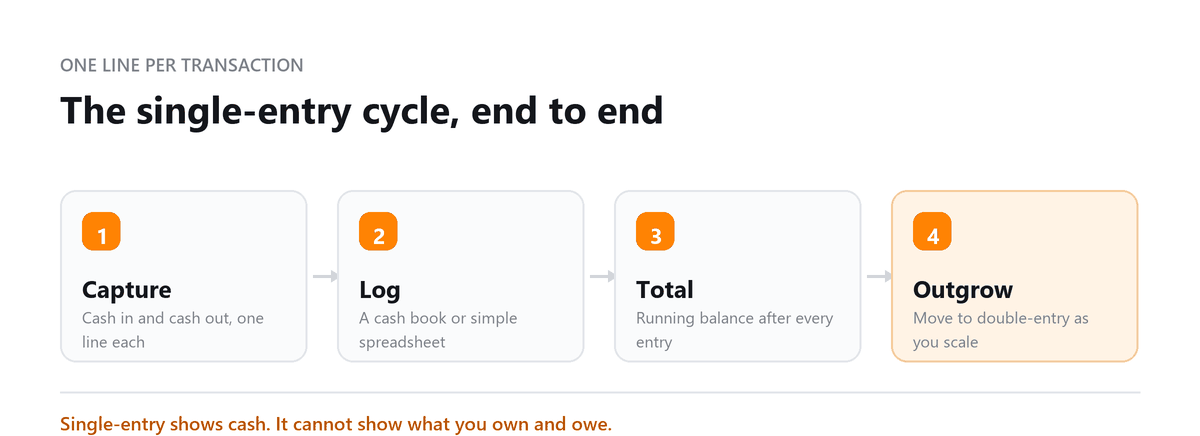
Single-entry bookkeeping, while less complex than double-entry, requires consistent record-keeping practices. Here's a breakdown of the basic steps involved:
- Choose a Bookkeeping System: Decide on your record-keeping method. Popular options include paper-based cash books, spreadsheets, or cloud accounting software for single-entry bookkeeping.
- Record Every Transaction: Every income and expense, no matter how small, needs to be recorded. Develop a habit of entering transactions daily or weekly to avoid backlogs.
- Categorize Transactions: Classify each transaction into relevant categories like income, expenses (further categorized as rent, utilities, supplies, etc.), and owner's equity (withdrawals or investments made by the owner).
- Maintain a Running Balance: For each category (income, expenses, owner's equity), keep a running total to track how much money has flowed in and out. This helps you understand your overall financial position.
- Reconcile Bank Statements Regularly: Regularly compare your records with your bank statements to identify discrepancies or missing transactions. This ensures the accuracy of your financial data.
- Generate Reports: While single-entry doesn't provide a formal balance sheet, you can generate basic reports to understand your profitability. These reports can include income statements summarizing your revenue and expenses over a period or cash flow statements tracking your cash inflows and outflows.
Remember, consistency is key! Regularly recording transactions and reconciling your accounts will give you a clearer picture of your business's financial health.
Who Uses Single-Entry Bookkeeping?
While not suitable for complex financial operations, single-entry bookkeeping shines for various business types:
- Freelancers and sole proprietors: Track income and expenses for tax purposes
- Small retail shops: Record daily sales and purchases
- Independent contractors: Monitor project-related income and expenses
- Home-based businesses: Keep tabs on their financial activity effectively
What Documents are Used to Record Single-Entry Bookkeeping?
Single-entry bookkeeping relies on a few key documents to capture and record financial transactions:
- Sales Receipts: These document the sale of goods or services to customers, typically including details like date, customer information, item description, and sales amount.
- Purchase Receipts: This document purchases the business makes, including details like date, vendor information, item description, and purchase amount.
- Bank Statements: Bank statements record all deposits, withdrawals, and other banking activity associated with your business bank account(s). Regularly reconcile your bank statements with your bookkeeping records to ensure accuracy.
- Check Registers: If you use checks for payments, maintain a check register to record the check number, date, payee, payment amount, and purpose of the payment.
- Cash Flow Log: This optional document can be helpful for businesses that handle a significant amount of cash transactions. It lets you track all cash inflows (sales, deposits) and outflows (payments, withdrawals) daily or weekly.
While the specific documents used may vary depending on the business, maintaining clear and organized records of these essential documents is crucial for accurate single-entry bookkeeping. Some cloud-based accounting software designed for single-entry bookkeeping can also help streamline the document management process.
Example of Single-Entry Bookkeeping
Let's delve deeper with a practical example. Mary runs a small bakery and uses single-entry bookkeeping. Here's a glimpse into her records for a week:
| Date | Description | Income (+) | Expense (-) |
|---|---|---|---|
| Mon | Sold 20 loaves of bread | $60 | |
| Tue | Bought flour and supplies | $25 | |
| Wed | Catering order, office lunch | $120 | |
| Thu | Paid electricity bill | $40 | |
| Fri | Weekend bread batch sales | $80 | |
| Weekly Totals | $260 | $65 |
By analyzing this simplified log, Mary can quickly track her weekly income and expenses, enabling her to make informed decisions about her business.
Importance of Single-Entry Bookkeeping for Small Business
For small businesses, the benefits of single-entry bookkeeping are undeniable:
- Simplicity: Easy to learn and implement, even for non-accounting professionals
- Time-saving: Saves valuable time compared to double-entry bookkeeping methods
- Cost-effective: Eliminates the need for expensive accounting software or personnel
- Provides basic financial insights: Tracks income, expenses, and cash flow effectively
Advantages of Single-Entry Bookkeeping System
While simplicity is its core strength, single-entry bookkeeping offers several additional advantages:
- Suitable for cash-based businesses: Efficiently tracks cash transactions, which are predominant for many small businesses.
- Easy to adapt: Can be readily adjusted to your specific business needs.
- Provides a starting point: Can be upgraded to double-entry bookkeeping as your business grows.
Single-Entry Bookkeeping vs. Double-Entry Bookkeeping
While single-entry bookkeeping offers ease of use, double-entry bookkeeping provides a more comprehensive picture of your finances:
| Feature | Single-Entry | Double-Entry |
|---|---|---|
| Complexity | Simpler | More complex |
| Transactions Recorded | Once | Twice (Debit and Credit) |
| Financial Insights | Basic (cash flow, income/expenses) | Detailed (assets, liabilities, owner's equity) |
| Suitable For | Small businesses with low transaction volume | Businesses of all sizes with multiple accounts |
| Recording Method | Focuses on cash-based transactions | Uses the accounting equation (Assets = Liabilities + Equity) |
| General Ledger | Not required; may use a cash register or spreadsheet | Mandatory: central record with debits and credits |
| Financial Statements | Limited to basic income statements and cash flow | Full balance sheet, income statement, cash flow, equity statement |
| Scalability | Limited as business grows | Highly scalable; accommodates complex financial activity |
Wrapping Up: Choosing the Right Bookkeeping System
Single-entry bookkeeping offers a clear path for small businesses to keep track of their finances without getting bogged down in accounting complexities. Its simplicity, affordability, and focus on cash flow make it an ideal choice for freelancers, sole proprietors, and other small operations. However, it's crucial to understand its limitations and be prepared to switch to double-entry when your business expands.
Choosing between single-entry and double-entry bookkeeping depends on your needs and financial complexity. If you're unsure which method suits your business, consider seeking professional advice.
Book a free consultation and we will move you onto a system that keeps up.
Single-Entry Bookkeeping FAQs
Is single-entry bookkeeping acceptable for tax purposes?
Yes, for very small businesses and sole proprietors with simple finances. The IRS does not mandate a specific bookkeeping method for most small businesses. However, if your business is incorporated, has employees, or carries inventory, you'll generally need double-entry bookkeeping to meet tax and reporting requirements.
What is the main disadvantage of single-entry bookkeeping?
It only gives you a partial picture. Single-entry tracks cash in and out but doesn't capture assets, liabilities, or equity. This makes it difficult to produce a balance sheet, detect fraud, or provide the financial statements that lenders and investors require.
When should I switch from single-entry to double-entry bookkeeping?
Switch when any of these apply: you hire employees, take on debt or investors, carry inventory, process more than 30 to 40 transactions per month, or need to produce formal financial statements. The sooner you make the switch, the easier the transition.
Can I use single-entry bookkeeping in Excel?
Yes, a simple income and expense spreadsheet in Excel is essentially single-entry bookkeeping. Set up columns for date, description, income, expense, and running balance. It's one of the most practical ways to start tracking your finances with no software cost.
What is an example of a single-entry transaction?
You receive $500 from a client for design work. In single-entry, you record one line: Date: 15 May 2026 | Description: Design invoice paid | Income: +$500. That's it, one entry, one account, one line. Compare this to double-entry, which would record both the cash received and the revenue earned across two separate accounts.

Written by
Ankit Sarawagi, CPA, CA, MBA
Ankit leads the finance team at Profitjets, where he has worked with 500+ businesses across the US on bookkeeping, tax and CFO-level strategy. He writes about the habits that keep small business books accurate all year. Connect on LinkedIn
Free consultation
Outgrowing Single-Entry?
Book a free consultation and we will move you onto a system that keeps up.