
Small businesses tend to think of bookkeeping software as one product: QuickBooks, Xero, or whatever the accountant recommended. Makes sense when you're just starting out but as the company grows revenues and liabilities become more spread out across email, photo albums, and whichever system is the easiest to forget when the accounting system is open. This is the accounting system's fault, not the bookkeeper's.
The most efficient companies tend to have a small stack of software. One accounting system at the middle that handles the ledger. And around it, a few specialized tools to handle the tasks the ledger can't, whether that's paying cash, capturing receipts, or receiving hundreds of supplier invoices per month.
Each of these tools will feed into the ledger, but the ledger will remain the single source of truth about the company's finances. This guide will show off 10 popular tools used to perform accounting, organized by the task they specialize in and some guidance on what kind of tools you need.
The mistake I see most often is choosing tools one at a time, without thinking about how they connect. A business signs up for accounting software, then a bill pay tool, then a receipt app, and each one creates its own version of the same transactions. By month-end the bookkeeper is deleting duplicates and hunting for payments that synced twice.
Before adding any tool, decide which system is the ledger, what each other tool is responsible for, and how its data gets back into the books. A stack of three well-connected tools beats seven that each work fine alone.
Ankit Sagatani, MBA, B.Com · LinkedInTop 10 Bookkeeping & Accounting Software
Bookkeeping and accounting software eliminates manual ledger work, automates bank reconciliation, and gives business owners the financial clarity needed to make better decisions. The market has consolidated significantly, a handful of cloud-based platforms now serve the vast majority of small and medium businesses. This guide covers the top 10 options, their real-world pricing, and how to choose the right one.
| # | Software | Standard Starting Price (approx. 2026) | Best For |
|---|---|---|---|
| 1 | QuickBooks Online | $38/month (Simple Start). The $7.50 you see advertised is half price for the first 3 months | US SMBs; broadest CPA/bookkeeper support |
| 2 | Xero | $25/month (Early plan, 20 invoices and 5 bills a month; Growing is $55/month) | Multi-user teams; international; clean UX |
| 3 | FreshBooks | $23/month (Lite, 5 clients). The $6 you see advertised is a promotional rate | Freelancers; service businesses; time tracking |
| 4 | Zoho Books | Free (under $50K revenue); $20/month (Standard) | Zoho ecosystem users; growing SMBs |
| 5 | Wave | Free (core); Wave Pro $19/month | Solopreneurs; very small businesses |
| 6 | Sage Business Cloud Accounting | Varies by plan, check Sage's current US pricing | UK and international SMBs; established Sage users |
| 7 | Melio | Free (Go plan, 5 ACH payments a month); Core $25/month | Accounts payable automation; B2B bill payment |
| 8 | ZarMoney | $20/month | Small businesses needing inventory + accounting |
| 9 | Plooto | $32/month (Grow) | Canadian businesses; cross-border payments |
| 10 | Tipalti | Custom enterprise pricing | Mid-market and enterprise AP automation |
Why Use Bookkeeping & Accounting Software?
- Eliminates manual data entry, bank feeds import and categorise transactions automatically
- Reduces errors, double-entry accounting enforces balanced books
- Real-time visibility, see cash position, invoices outstanding, and expenses any time
- Tax readiness, organised records save hours (and fees) at tax time
- Accountant collaboration, cloud platforms allow your CPA to access books remotely
- Scalability, grow from sole trader to multi-entity without switching platforms
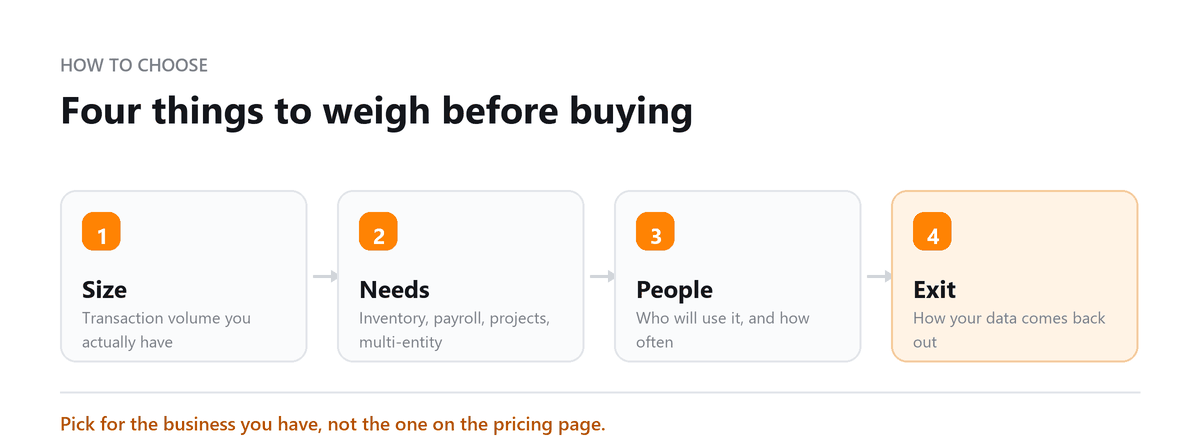
What to Look For When Choosing
| Feature | Why It Matters |
|---|---|
| Bank feeds | Automatic transaction import eliminates manual entry, non-negotiable for any volume above 20 transactions/month |
| User limit | QuickBooks limits users by plan; Xero includes unlimited users, critical for teams with bookkeeper + owner + CPA |
| Payroll integration | Built-in (QBO) vs third-party (Xero via Gusto); affects setup complexity and cost |
| Invoicing | Volume limits on entry plans (Xero Early = 20 invoices/month; FreshBooks Lite = 5 clients) can force early upgrades |
| Multi-currency | Required for any business invoicing or paying in foreign currencies; typically a higher-tier feature |
| Mobile app | Receipt capture and on-the-go invoicing, important for field-based businesses |
| Accountant access | Most platforms allow a free accountant/bookkeeper login; QBO requires a user slot |
Building a Stack That Fits Your Business
Start with the ledger. Choose core accounting software based on who needs access, what has to connect to it, and whether your accountant is comfortable working in it. For many small businesses that's the whole stack for the first year or two.
Add supporting tools only when a specific workflow starts costing real time. That might be paying dozens of vendor bills a month, chasing approvals over email, or entering supplier invoices by hand. When you add one, decide upfront whether bills are created in the tool or in the ledger, which system records the payment, and how the two stay reconciled. That one decision prevents most duplicate-transaction problems.
We chose our accounting software based on the advertised starting price, only to discover at renewal that the original rate was promotional and the ongoing cost was much higher. Profitjets compared the renewal price with alternative platforms based on our actual users, integrations, reporting needs, and transaction volume, so we could make the decision based on the full cost rather than the introductory offer.
QuickBooks Online and Xero are the two most common accounting platforms across Profitjets clients, with QuickBooks Online representing approximately 60% of the client base. The most common migration is from QuickBooks Desktop to QuickBooks Online, typically taking 2 to 4 weeks depending on the complexity of the books and the amount of historical data being transferred.
Book a free consultation and we will pick it, set it up and run it.
FAQs
Is there truly free bookkeeping software?
Yes. Wave offers free core accounting, including invoicing, expense tracking, and bank reconciliation. It makes money through payment processing and paid add-ons. It suits freelancers and very small businesses, but most companies with employees, inventory, or several people in the books eventually move to a paid platform.
Do I need a bookkeeper if I use accounting software?
Software imports and suggests categories for transactions, but it doesn't guarantee they're right. A bookkeeper reviews categories, reconciles accounts, records accruals, and catches errors automation misses. Once transaction volume grows past what an owner can review carefully each month, part-time bookkeeping usually pays for itself.
When should I add a bill pay or AP tool?
When paying vendors starts taking real time or needs approvals from more than one person. A handful of bills a month is easy to manage in your accounting software. Dozens of bills, multiple approvers, or international payees are usually the point where a dedicated tool saves time and reduces errors.
Why do promotional prices matter when comparing software?
Many vendors advertise heavily discounted rates for the first few months. If you compare tools on those prices, your budget can jump sharply when the promotion ends. Always compare standard monthly pricing and check what happens to the rate after the introductory period.
Can supporting tools cause problems in my books?
They can, if they're not set up carefully. The most common issue is the same bill or payment being recorded in both the tool and the ledger. Decide which system creates each type of transaction, connect the integration properly, and reconcile regularly so the two stay in agreement.

Written by
Ankit Sagatani, MBA, B.Com
Ankit works with business owners across the US on industry-specific bookkeeping, from real estate to construction and retail. He writes about what each trade's books actually need. Connect on LinkedIn Connect on LinkedIn
Free consultation
Want Help Choosing and Setting It Up?
Book a free consultation and we will pick it, set it up and run it.