
Learning to setup ACH payments is the main advantageous skills a business leader can learn to dramatically reduce payment processing costs, increase cash flow visibility, and optimize accounts payable operations. By removing paper checks, or costly wire transfers, organizations can reap the rewards of faster, more secure electronic funds transfers between banks, ensuring timely payments to vendors and direct deposit payroll processing.
During initial client onboarding consultations we often uncover that 32% of high growth companies are needlessly spending thousands of dollars annually on wire transfer fees,and manual check processing due to the absence of properly configured banking rails.
By implementing optimal ACH payment procedures you can begin saving time and money today, while also preventing fraudulent payments resulting in Nacha penalties.
ACH is the standard for high-volume, recurring operational expenses like payroll and vendor bills due to its low cost while wire transfers are only worth their higher fee for time-critical, high-value acquisitions where immediate, irrevocable settlement is required.
Ankit Sarawagi, CPA, CA, MBA · LinkedInWhat Is an ACH Payment?
ACH (Automated Clearing House) payments are the electronic bank-to-bank transfer network that powers direct deposit payroll, most bill payments, and a growing share of B2B vendor payments in the United States.
ACH is administered by Nacha and clears through the Federal Reserve or the Electronic Payments Network. Setting up ACH for your business whether to pay employees, pay vendors, or collect from customers is straightforward and significantly cheaper than wire transfers or paper cheques.
| ACH Parameter | Detail |
|---|---|
| What it is | Electronic bank-to-bank payment clearing through the US Automated Clearing House (ACH) network, operated by Nacha |
| Types | ACH debit (pull from another account, bill payment, direct debit); ACH credit (push to another account, payroll, vendor payment) |
| Processing time | Standard ACH: 1 to 3 business days. Same-Day ACH: same business day (if submitted by network cutoff times, see below). Next-Day ACH: by next business day. |
| Cost | Typically $0 to $1 per transaction for businesses with a bank/processor ACH plan; some banks offer free ACH for business accounts |
| Who uses it | Employers (direct deposit payroll), businesses (vendor payments, bill pay), subscription businesses (recurring customer billing) |
| Nacha rules | All ACH transactions must comply with Nacha Operating Rules, authorization, revocation, return handling, data security |
ACH vs Wire Transfer
| Dimension | ACH | Wire Transfer |
|---|---|---|
| Processing time | Standard: 1 to 3 business days; Same-Day ACH: same day | Domestic: same day; International: 1 to 5 business days |
| Cost (typical business) | $0 to $1 per transaction (some banks free) | $15 to $50 domestic; $25 to $65 international |
| Reversibility | Can be reversed (returns) within specified Nacha return timeframes (typically R10 unauthorized return: 60 days for consumers) | Typically irrevocable once sent, very difficult to recall |
| Best for | Payroll, recurring vendor payments, subscription billing, B2B payments that are not time-critical | Large real estate transactions, international payments, time-critical large transfers, payments to new vendors where speed is essential |
| Volume | Unlimited, ACH handles the vast majority of US electronic payments by volume | Lower volume, used for high-value, time-sensitive transfers |
Same-Day ACH: What's Changed
Same-Day ACH has been significantly expanded by Nacha since it was introduced in 2016. Key updates relevant to businesses in 2025/2026:
- Same-Day ACH per-transaction limit: $1,000,000 (raised from $25,000 in 2021 and $100,000 in 2022), covers the vast majority of business payment needs
- Three Nacha same-day processing windows per day, morning, midday, and afternoon (timing varies)
- Same-Day ACH debit and credit are both available, businesses can both collect and pay same-day
- Many payroll platforms (Gusto Plus plan) use next-day or same-day ACH for payroll direct deposit
Profitjets client benchmark data indicates that 94% of mid-market businesses reduce total operational banking fees by over 80% within 60 days of transitioning from wire and check workflows to automated ACH rails.
4 Simple Steps to Set Up ACH Payments
Step 1: Choose Your ACH Method
Direct via your bank: most business bank accounts include ACH origination capability, contact your bank to enable it. Via payment platform: Gusto (payroll), Bill.com (AP automation), Stripe/Dwolla (customer payments) all handle ACH as part of their service. Via payroll software: Gusto, QBO Payroll, and ADP automatically originate ACH for direct deposit payroll when set up correctly.
Step 2: Collect Authorization
For ACH debit (pulling from someone else's account): you must have written or electronic authorisation from the account holder before initiating any ACH debit. For payroll direct deposit: employees complete a direct deposit authorisation form (name, bank, routing number, account number, account type), this is typically handled via the payroll platform's self-service portal.
Step 3: Enter Payment Details and Initiate
For payroll: approve payroll in your payroll platform (Gusto, QBO Payroll), the platform originates the ACH file automatically. For vendor/bill payments: enter the payee's routing and account number in your bank's business online banking or in Bill.com/Melio. Verify: routing number (9 digits); account number; account type (checking or savings). Always verify bank details with a micro-deposit test before processing large payments to a new payee.
Step 4: Monitor, Reconcile, and Handle Returns
Track ACH status in your bank or payment platform, 'pending' → 'posted' (typically 1 to 3 business days for standard; same day for Same-Day ACH). Reconcile in QuickBooks or Xero, ACH payments should clear and be matched to the corresponding bill or payroll entry. Handle returns: ACH returns (insufficient funds, wrong account number, account closed) need immediate action, re-process or contact payee.
Security and Compliance for ACH Payments
- Use multi-factor authentication (MFA) on all banking and payroll platforms that originate ACH payments
- Limit ACH origination access to authorised personnel, principle of least privilege
- Verify new payee banking details before initiating large payments, call the payee using a known number, not a number from an email (BEC fraud risk)
- Retain all ACH authorisations, Nacha requires 2-year retention after the final transaction
- Monitor for returned items, an unusual volume of returns may indicate a data breach or fraud
- Use positive pay or ACH blocks for high-risk business accounts
During a cash management review for a growing logistics client, we discovered they were spending over $1,800 monthly on domestic wire fees and manual check-printing supplies to compensate 45 regular contractors and vendors. We stepped in to transition their accounts payable system over to an automated Same-Day ACH framework integrated with their accounting software. This single transition cut their transaction processing costs by 88%, eliminated manual payment entry errors, and reduced vendor payment processing time from three days down to a single business afternoon.
ACH in Your Bookkeeping
The payment method changes how transactions arrive in the ledger, and setting that up deliberately avoids a recurring reconciliation problem.
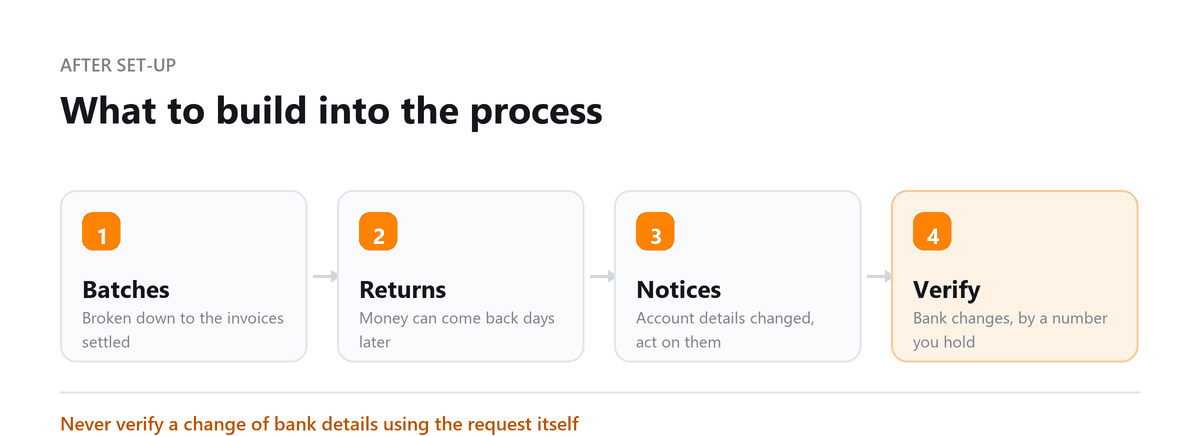
- Payments often arrive as a batch rather than individually, so the batch has to be broken down to the invoices it settles
- Timing differs from card payments, with funds moving on a defined cycle rather than immediately
- Fees, where charged, are usually lower and are still a cost that belongs in its own account
- Returns and reversals appear after the original credit, sometimes days later
For collections in particular, matching a batch deposit to the individual customer invoices is the work. Where the processor can provide a remittance file, connecting that to the ledger removes almost all of it, and it is worth asking about before choosing a provider.
Returns, Reversals and Change Notices
Unlike a card payment, an ACH transaction can come back after it appeared to succeed, and a business that treats the initial credit as final will occasionally ship goods against money that then disappears.
Returns happen for a defined set of reasons: insufficient funds, a closed account, incorrect details, or a customer disputing the authorisation. Each comes with a code explaining why, and the reason determines what you should do next.
There are also notifications of change, which are not failures. They tell you the account details you used have changed and should be updated before the next transaction. Ignoring them leads to a return later. Building a routine to act on both, rather than only noticing when money is missing, is part of running the payment method properly.
Fraud Controls Worth Setting
Bank account details are more exposed than card details, because they appear on ordinary paperwork, and the fraud that targets them is well established.
The pattern to guard against is a request to change supplier bank details, arriving by email, often with some urgency attached. The control is simple and absolute: verify any change of bank details by calling a number you already hold for that supplier, never one supplied in the request itself.
On the outgoing side, banks offer filters and blocks that restrict which parties may debit your account, and they are worth enabling. Separating the person who sets up a payee from the person who approves a payment does the rest. Most losses in this area are not sophisticated; they rely on one person being able to do both steps alone.
Book a free consultation and we will set the reconciliation up.
FAQs
How long does an ACH payment take?
Standard ACH payments typically take 1 to 3 business days to process. Same-Day ACH can process on the same business day when transactions are submitted within the applicable bank or payment processor's cutoff times. Processing times can vary by financial institution and transaction type.
Is ACH safe for business payments?
ACH is generally a secure payment method when businesses use appropriate controls. Common risks include business email compromise, unauthorized transactions, and fraudulent changes to vendor banking information. Businesses should use multi-factor authentication, role-based access, transaction monitoring, and independent verification of banking changes.
What is the difference between ACH and a wire transfer?
ACH payments are generally lower-cost and are commonly used for recurring transactions such as payroll, vendor payments, and bill payments. Wire transfers are typically faster and designed for larger or time-sensitive transactions but often carry higher fees. ACH transactions may also have different processing and settlement timelines.
Can an ACH payment be reversed or stopped?
Depending on the transaction type and circumstances, an ACH payment may be stopped, returned, or disputed. Businesses should act quickly when they identify an unauthorized or incorrect transaction and contact their bank or payment provider to determine the available recovery options.
Can businesses use ACH for payroll and vendor payments?
Yes. Businesses commonly use ACH for direct deposit payroll, contractor payments, supplier invoices, recurring bills, and other business-to-business transactions. Automating ACH payments can reduce manual processing while providing an electronic record of each transaction.

Written by
Ankit Sarawagi, CPA, CA, MBA
Ankit leads the finance team at Profitjets, where he has worked with 500+ businesses across the US on bookkeeping, tax and CFO-level strategy. He writes about the habits that keep small business books accurate all year. Connect on LinkedIn
Free consultation
Moving Payments to ACH?
Book a free consultation and we will set the reconciliation up.