
Not every employer attaches this schedule. The ones who do are reporting something more specific than the return itself asks for: not what was owed for the quarter, but when each liability arose within it.
That distinction is the whole difficulty. The schedule reports liabilities by the day they were incurred, not by the day they were paid, and a schedule reconstructed backwards from bank payments will not agree with the return it accompanies.
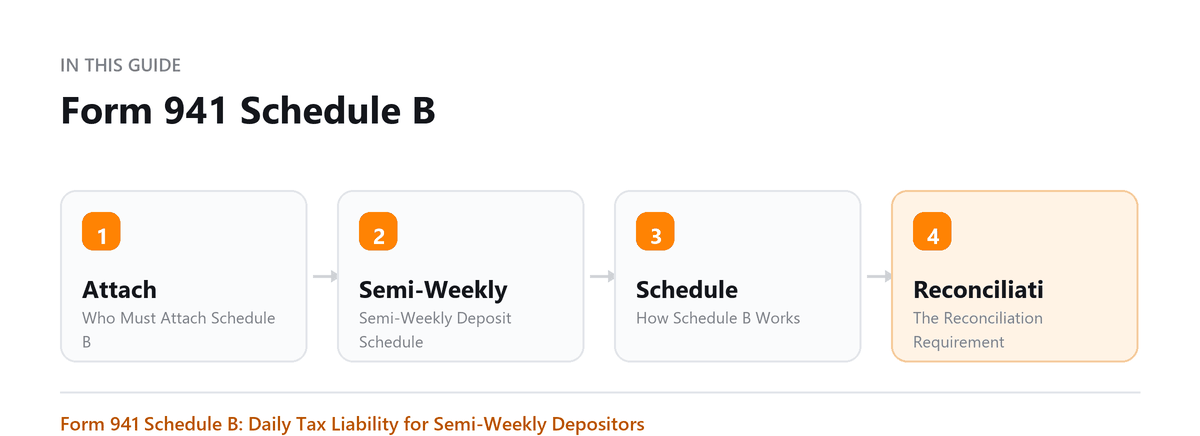
This covers who has to attach it, how the deposit schedule is determined, how the schedule is completed, and what happens when it disagrees with the return.
Form 941 Schedule B (Report of Tax Liability for Semiweekly Schedule Depositors) is a supplemental form that tells the IRS the exact day-by-day breakdown of your payroll tax liability each quarter. It is required only for semi-weekly depositors, not all employers need it. Attaching it incorrectly is one of the most common Form 941 mistakes.
Who Must Attach Schedule B
You must attach Schedule B to Form 941 if you are a semi-weekly schedule depositor. You become a semi-weekly depositor if:
- Your total Form 941 tax liability (federal income tax withheld + both employee and employer shares of Social Security and Medicare) exceeded $50,000 during the lookback period (the four quarters ending June 30 of the prior year)
- You had more than $100,000 in tax liability in a single day during the current or prior year (this makes you a semi-weekly depositor immediately, for the rest of the current and following year)
If you are a monthly depositor (liability $50,000 or under in the lookback period), do NOT attach Schedule B. Using Schedule B when you are a monthly depositor creates an artificial discrepancy that the IRS will flag.
Record the liability on the day it arises rather than reconstructing the schedule from the payments you made. This reports when liabilities were incurred, not when they were paid, and building it backwards from the bank is precisely how the two end up disagreeing.
Ankit Sarawagi, CPA, CA, MBA · LinkedInSemi-Weekly Deposit Schedule
Semi-weekly depositors follow this schedule:
| Payday | Deposit Due |
|---|---|
| Wednesday, Thursday, or Friday | The following Wednesday |
| Saturday, Sunday, Monday, or Tuesday | The following Friday |
Federal holidays can extend the due date by one business day. Deposits of $100,000 or more must be made the next business day, regardless of your regular deposit schedule.
How Schedule B Works
Schedule B has three monthly calendars (one for each month in the quarter). For each calendar day, you enter the amount of federal payroll tax that you became liable for on that day, this is not when you deposited the tax, but when the liability arose (i.e., the payroll date).
- Day 1 of Month 1, Day 2, Day 3... through the last day of Month 3
- The total of all daily entries must equal the tax liability reported on Form 941, Line 12
- Days with no payroll have no entry (or zero)
Pro Tip: The liability date is the pay date, not the check date or the deposit date. If you processed payroll on Wednesday but employees receive checks Friday, the liability date is Friday.
The Reconciliation Requirement
The most important rule for Schedule B: the total of all daily entries across the three monthly calendars must exactly equal the amount on Form 941, Line 12 (Total tax liability for the quarter). A one-cent discrepancy will cause the IRS to flag the return.
- Over-deposits: Schedule B total greater than Form 941, Line 12, IRS may apply the overage to future quarters
- Under-deposits: Schedule B total less than Form 941, Line 12, IRS will assess a failure-to-deposit penalty
Common Mistakes
- Monthly depositors attaching Schedule B, this is incorrect and creates reconciliation problems
- Entering deposit dates instead of liability dates on the calendar
- Schedule B total not matching Form 941, Line 12
- Using the wrong quarter's calendar
- Not attaching Schedule B when required (semi-weekly depositors must attach it every quarter)
- Manually completing Schedule B incorrectly because of payroll software errors
What Happens If Schedule B Is Wrong
If Schedule B totals do not match Form 941, Line 12, the IRS will:
- Send an IRS notice asking for an explanation or correction
- Potentially assess a failure-to-deposit penalty if the discrepancy suggests deposits were late
- Request that you file a corrected Schedule B (there is no separate amendment form for Schedule B, correct through Form 941-X if needed)
Lookback Period and Deposit Schedule Determination
Every November, the IRS determines each employer's deposit schedule for the following year based on the lookback period (July 1 of the year before last through June 30 of last year):
| Total Lookback Period Liability | Deposit Schedule |
|---|---|
| $50,000 or less | Monthly depositor |
| More than $50,000 | Semi-weekly depositor (must attach Schedule B) |
| $100,000+ in any one day | Automatically semi-weekly for rest of year and following year |
| New employer | Monthly depositor for first year |
Tips for Accurate Schedule B Completion
- Use your payroll software's Schedule B report if available, most payroll systems generate it automatically
- Reconcile the daily entries to your payroll register before finalizing
- Match the total to Form 941 Line 12 before submitting
- Keep payroll records showing the exact payroll dates in case the IRS questions your daily entries
Book a free consultation and we will take the return off your desk.
Frequently Asked Questions
Can a semi-weekly depositor switch to monthly?
Yes, but only if your lookback period tax liability drops to $50,000 or below. The IRS notifies you of your deposit schedule change. You cannot self-select your deposit schedule.
What if we have no payroll in one month of the quarter?
Leave the calendar for that month blank (or enter zeros). You still file Form 941 for the quarter, and the zero-liability month is reflected in Schedule B with no entries.
Our payroll runs every two weeks, how do we fill in Schedule B?
Enter the full payroll tax liability for that pay date on the single payroll date. If payday is Friday, July 12, enter the full quarter's liability amount that arose on July 12 on the Day 12 cell of the July calendar.
What is the difference between Schedule B and the deposit record?
Schedule B shows when the liability arose (payroll dates). Your deposit record shows when you actually transferred the funds. These dates are different. The IRS compares both to ensure you deposited on time relative to your liability dates.
What is the most reliable way to keep this accurate?
Record the liability on the day it arises rather than reconstructing the schedule at the end of the quarter from the payments you made. The schedule reports when liabilities were incurred, not when they were paid, and building it backwards from the bank is exactly how the two end up disagreeing. A payroll system that produces the daily liability figures directly removes most of the risk here.

Written by
Ankit Sarawagi, CPA, CA, MBA
Ankit leads the finance team at Profitjets, where he has worked with 500+ businesses across the US on bookkeeping, tax and CFO-level strategy. He writes about the habits that keep small business books accurate all year. Connect on LinkedIn
Free consultation
Want the Filing Handled?
Book a free consultation and we will take the return off your desk.