
For most businesses in 2026 this decision has already been made by Intuit. QuickBooks Desktop sales to new subscribers have been gradually tapered, the perpetual licence model has vanished, and the company's direction is clear.
Therefore, the question isn't which to choose but whether you're one of the businesses who have a genuine need to stay on Desktop and what it costs to transition if you're not.
Those reasons do exist and are specific: detailed job costing, serial and lot tracking, industry editions and very large transaction volumes. If none of these apply to you, QuickBooks Online is where you're going, and doing it on your own timeline is markedly more preferable than doing it on Intuit's.
This guide covers what genuinely differs, who still has a case for Desktop and what a migration actually entails.
The businesses with a real reason to stay are construction firms with job costing built around Desktop's structure, and anyone running serial or lot tracking in Enterprise. Online has narrowed the gap but hasn't closed it on either. Everyone else who's still on Desktop is there because migrating is disruptive and there's never a good month for it which is a reason to plan it, not a reason it won't happen.
Anu Gupta, CA, EA, B.Tech · LinkedInWhere Desktop stands
- What's established: perpetual licences are gone, Desktop moved to annual subscription, and new-subscriber availability has been progressively restricted. Existing subscribers have been able to renew, and Enterprise has remained available longest.
- What that means practically: if you're choosing today and Desktop isn't a requirement, choose Online. If you're on Desktop, plan a migration on a timeline you control rather than waiting for a support end date to force it.
Pricing Comparison
| QuickBooks Online | QuickBooks Desktop | |
|---|---|---|
| Pricing Model | Monthly subscription | Annual subscription (perpetual licences discontinued for Pro/Premier 2024) |
| Entry Price | Simple Start ~$38/month | Pro Plus ~$549/year (approx.), verify current Intuit pricing |
| Mid Tier | Essentials ~$85/month (3 users) | Premier Plus ~$779/year (approx.) |
| Upper Tier | Plus ~$140/month (5 users); Advanced ~$340/month | Enterprise ~$1,410/year+ (up to 40 users) |
| Payroll | Add-on ~$45/month + per-employee fee | Add-on, Enhanced or Full Service options |
| Upgrades | Automatic, always on latest version | Annual subscription includes current year version |
NOTE: Intuit ended new sales of QuickBooks Desktop Pro Plus and Premier Plus for new subscribers in 2024. Existing subscribers can renew. QuickBooks Desktop Enterprise remains available. New users should default to QuickBooks Online unless they specifically need Desktop-only features.
Feature Comparison
| Feature | QuickBooks Online | QuickBooks Desktop |
|---|---|---|
| Access | Browser, any device with internet | Locally installed, limited to the computer(s) it is installed on |
| Multi-User | Yes, cloud-based, concurrent access | Yes, requires additional user licences |
| Mobile App | Full-featured iOS/Android app | No mobile app |
| Automation | Automated bank feeds, recurring transactions, rules | Less automation, more manual entry |
| Integrations | 750+ third-party apps | Limited compared to Online |
| Reporting | 100+ reports; customisable | Advanced, more granular, industry-specific options |
| Inventory | Moderate, FIFO costing on Plus+ | Advanced, average cost, FIFO, serial/lot tracking (Enterprise) |
| Job Costing | Via Projects on Plus+ | Detailed job costing, better for construction/project businesses |
| Industry Editions | No industry-specific versions | Contractor, Manufacturing, Nonprofit, Retail, Professional Services editions |
| Data Backup | Automatic cloud backup | Manual backup required, local or to USB |
| Offline Access | Requires internet | Works offline, internet only for bank feeds |
Who Should Use Each
| Use QuickBooks Online if… | Use QuickBooks Desktop if… |
|---|---|
| You need access from multiple locations or devices | You are in construction, manufacturing, or need detailed job costing |
| You want automatic updates and no IT maintenance | You need industry-specific versions (Contractor, Manufacturing) |
| Your accountant/bookkeeper works remotely | You have complex inventory needs (serial numbers, lot tracking) |
| You are starting a new business in 2025 or later | You have large transaction volumes that slow Online |
| You want third-party app integrations | You are an existing Desktop user with established workflows, migration cost may not be worth it |
What migration actually involves
Intuit provides a built-in tool, and it moves more than people expect and less than everything.
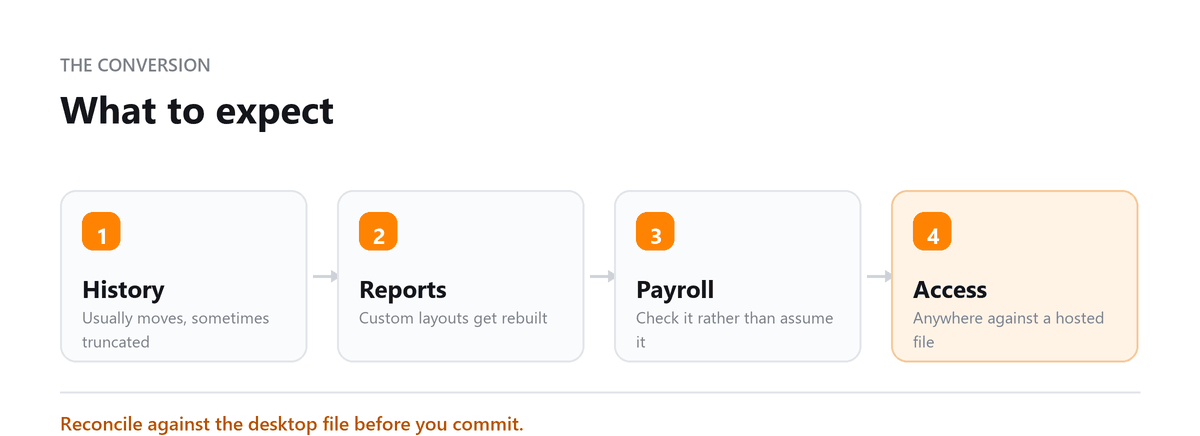
- Usually migrates cleanly: chart of accounts, customers, vendors, transaction history, items, and open balances.
- Usually needs rebuilding: custom reports, memorised transactions, job costing structures where Online has no direct equivalent, some payroll history, attachments in certain configurations, and any workflow built around a Desktop-only feature.
- Worth doing alongside the migration: rebuild the chart of accounts for the business you have now rather than replicating what Desktop held. Most migrations carry across a structure that accumulated over a decade, and this is the free opportunity to fix it.
- Practical sequencing: migrate at a period end, ideally year-end. Keep the Desktop file accessible afterward, don't uninstall, and take a proper backup, because you'll want it for historical lookups and for anything the tool didn't bring across. Expect a few weeks where things need adjusting.
Get your accountant to review the result before relying on it. Balances that migrate incorrectly are much cheaper to fix in week one than at year-end.
We moved from QuickBooks Desktop to Online because our accountant needed remote access to the books, but the migration wasn't as clean as we expected. Some of our custom reports stopped working, several recurring transactions didn't carry over correctly, and we had to reconnect a few bank feeds manually. Profitjets went through the migrated file, rebuilt the reports we actually used, fixed the account mappings, and cleaned up the bank feeds.
The biggest improvement was that our accountant could finally work in the books remotely without us having to send backup files back and forth.
Book a free consultation and we will reconcile it before you rely on it.
Frequently Asked Questions
Is QuickBooks Desktop being discontinued?
Intuit has progressively wound down new-subscriber availability and moved Desktop to subscription only, with Enterprise remaining available longest. Whether a hard end date has been announced for your edition is worth checking directly, since the position has continued to change. The strategic direction is unambiguous either way.
Can I migrate from Desktop to Online?
Yes, using Intuit's built-in migration tool. Transactions, customers, vendors and the chart of accounts move automatically. Custom reports, memorised transactions and Desktop-specific job costing structures generally need rebuilding manually. Plan for that rather than discovering it mid-migration, and have someone review the result before you depend on it.
Will Online be slower with a lot of transactions?
It can be. Very high transaction volumes and large file histories perform better in Desktop, which is one of the more legitimate reasons some businesses have stayed. If that's your situation, test with a realistic data volume rather than a sample before committing.
What happens to my Desktop file after migrating?
Keep it. Don't uninstall, and take a proper backup stored somewhere safe. You'll want it for historical detail the migration didn't carry across, and for anything you need to check against the original. Treat it as an archive rather than a system you're still running.
Can my accountant work in QuickBooks Online?
Almost certainly. it's the platform most US bookkeepers and CPAs now work in daily, and remote access is straightforward. If yours is still working in Desktop files sent back and forth, that friction alone is often worth the migration.

Written by
Anu Gupta, CA, EA, B.Tech
Anu works with US businesses on tax and entity questions at Profitjets, from choosing a structure to the filings that follow it. She writes about the decisions owners make once and then live with for years. Connect on LinkedIn
Free consultation
Planning a Conversion?
Book a free consultation and we will reconcile it before you rely on it.