
Clover and Square are the US small business point of sale default options, with comparisons running through hardware and processing rates.
What matters more and barely ever discussed is what difference each makes to your books. A POS that batches 4 days of sales into one deposit and nets its fees out before that money hits your account makes reconciliation work every month, which over 12 months will cost you more than the rate difference people agonize over.
There's also a structural difference in how each is sold that affects what you'll actually pay. Square sells direct at published rates. Clover is sold almost exclusively via merchant services resellers and what you're offered, your rate, contract term and termination terms are dictated by which reseller you sign with.
This guide covers where each fits, what to check before signing and how each one behaves once it's feeding your accounting system.
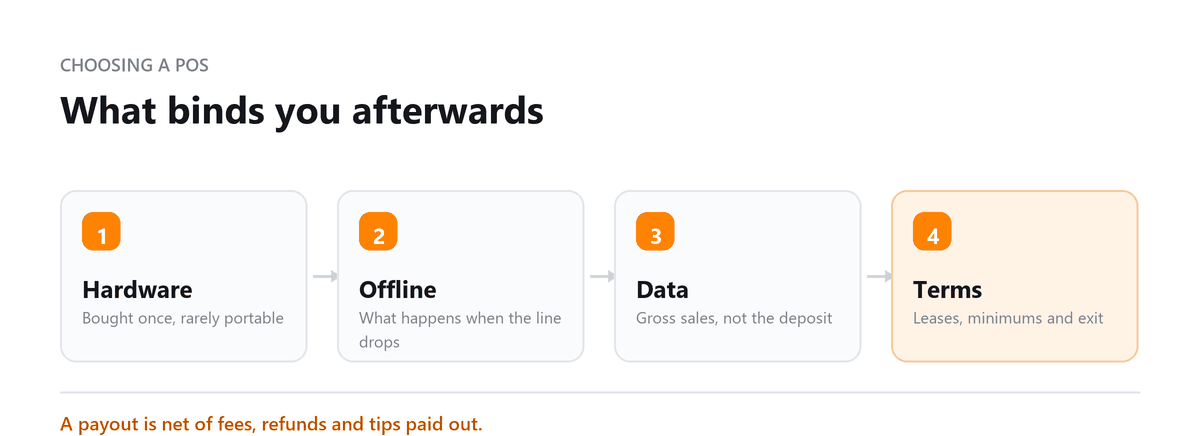
Ask how deposits arrive before you ask about the rate. A system that pays out gross and charges fees separately is reconcilable in minutes; one that batches multiple days and nets its fee out of the total means someone opens the portal every month and rebuilds what happened. On a small merchant that's an hour or two monthly, permanently, which is real money against a fraction of a percent on processing. Nobody asks this in the sales conversation and everybody deals with it afterward.
Anu Gupta, CA, EA, B.Tech · LinkedInAt a Glance
| Clover | Square | |
|---|---|---|
| Best For | Restaurants, retail needing advanced features and customisation | Small businesses wanting quick, simple, low-cost POS |
| Hardware Model | Proprietary Clover devices, must purchase Clover hardware | Some free hardware (basic reader); paid for advanced devices |
| Monthly Fees | Yes, monthly software plans required | No monthly fee at entry level (payment processing fees only) |
| Processing Fees | 2.3% to 3.5% + 10¢ depending on plan and card type | 2.6% + 10¢ (in-person); 2.9% + 30¢ (online) |
| Customisation | High, extensive app marketplace | Moderate, growing app marketplace |
| Contract | Month-to-month (via some resellers) | No contract, cancel anytime |
Hardware Comparison
| Hardware | Clover (approx.) | Square (approx.) |
|---|---|---|
| Mobile Reader | Clover Go, ~$49 | Square Reader, free (first one) or ~$10 |
| Compact Terminal | Clover Flex, ~$599 | Square Terminal, ~$299 |
| Countertop Terminal | Clover Mini, ~$799 | Square Stand, ~$149 (uses iPad) |
| Full POS Station | Clover Station Duo, ~$1,699 | Square Register, ~$799 |
| Restaurant/Bar Kit | Clover Station with KDS, custom quote | Square for Restaurants (software), $60/month + hardware |
Software and Features
| Feature | Clover | Square |
|---|---|---|
| Inventory | Advanced, real-time tracking, variants, modifiers | Basic, low-stock alerts, item management |
| Employee Management | Scheduling, time tracking, permissions, shift reports | Basic time tracking, team management add-on available |
| Loyalty/CRM | Built-in loyalty programme and customer profiles | Basic CRM, loyalty via third-party or Square loyalty ($45/month) |
| App Marketplace | Extensive, industry-specific apps | Growing marketplace, strong ecosystem |
| Reporting | In-depth, customisable sales and employee reports | Clean, easy dashboards, less granular than Clover |
| Online Selling | Online store integration | Free online store with every Square account |
| Restaurant Features | Kitchen display, table management, menu management | Square for Restaurants, separate plan |
| Accounting Integration | QuickBooks, Xero (via app) | QuickBooks, Xero, direct integrations |
| Offline Mode | Yes, processes payments offline | Yes, processes payments offline |
Pros and Cons
| Clover | Square | |
|---|---|---|
| Pros | Advanced features, customisation, extensive app marketplace; stronger employee management | No monthly fees at entry level; free basic reader; easy setup; strong online store |
| Cons | Proprietary hardware (locked in); higher upfront costs; some resellers charge activation fees | Less customisable; basic inventory vs Clover; loyalty costs extra |
| Best For | Medium-to-high-volume retail, full-service restaurants, multi-location businesses | New businesses, food trucks, market sellers, simple retail, ecommerce-first sellers |
What each does to your books
The part that determines how much your bookkeeping costs.
How deposits arrive Some configurations pay out gross and charge fees separately, which reconciles cleanly. Others batch several days of sales into one payout and deduct fees from the total, so the deposit matches no individual sale and someone has to reconstruct it from a portal report. Ask which before you commit.
Whether fees post separately A netted fee is invisible in your bank feed. It still needs recording as an expense, which means pulling a report to find it.
How sales tax flows through POS-collected sales tax has to reach your accounting system in a form that supports your filings. Both handle it; how cleanly depends on configuration, and misconfigured tax mapping is a common source of filing problems.
Whether the sync produces detail or a daily total A daily summary entry is easier to reconcile and tells you nothing. Transaction-level detail is more useful and more work. Decide which you want before it's set up, because changing it later means reworking history.
Refunds, tips and chargebacksThese are where integrations most often produce entries that don't balance. Worth testing specifically in the first month rather than discovering at year-end.
Square's direct QuickBooks and Xero integrations are generally simpler to set up. Clover routes through marketplace apps, which adds a configuration layer and, occasionally, a subscription.
Which to choose Clover vs Square
Square if you're starting out, you want to be trading this afternoon, you sell at markets or events, you're ecommerce-first, or your volume doesn't justify a monthly software fee. Also if you value being able to leave without a conversation.
Clover if you run a full-service restaurant needing table management and kitchen display, you have multiple locations or significant staff to schedule, your inventory has real complexity, or you need industry-specific apps Square doesn't offer.
- One caution on Square worth knowing: payment processors including Square can hold funds pending review after unusual activity, a large ticket, a sudden volume change, a chargeback pattern. It resolves, but it takes days, and a small merchant with one payout stream can feel it badly. Keep a cash buffer rather than running on next-day deposits alone.
- And on Clover: the cost of leaving is real. Proprietary hardware plus a reseller contract means switching is expensive in a way Square switching isn't. Weight that if you're genuinely unsure.
Book a free consultation and we will connect it to your books properly.
Frequently Asked Questions
Can I use Square or Clover without a monthly fee?
Square has no mandatory monthly fee at entry level: you pay processing only, with paid tiers for restaurant features and loyalty. Clover requires a software plan on top of hardware and processing, and what that costs depends on your plan and your reseller.
Which is better for a restaurant?
Clover is generally stronger for full-service: table management, kitchen display and staff scheduling are built in rather than bolted on. Square for Restaurants is a serious alternative, particularly for quick-service, and the hardware costs considerably less. Full-service operations with multiple front-of-house staff usually find Clover's depth worth it; counter-service operations often don't.
Which integrates better with QuickBooks?
Square's integration is direct and simpler to configure. Clover connects through marketplace apps, which works but adds a layer. What matters more than which is how it's configured: deposit handling, fee posting and sales tax mapping determine whether your monthly reconciliation takes ten minutes or an hour. Have whoever does your books set it up rather than accepting the defaults.
Can I switch from one to the other later?
From Square, easily no contract, and the hardware cost you little. From Clover, less so: proprietary hardware that generally can't move to another processor, plus whatever your reseller agreement says about early termination. Check those terms before signing, not when you want to leave.
What processing rate should I expect?
Square publishes its rates and they're the same for everyone. Clover's depend on your reseller, which is why two similar businesses can pay noticeably different rates on identical hardware. If you're going Clover, get quotes from more than one reseller, it's a negotiation, and most merchants don't realise that.

Written by
Anu Gupta, CA, EA, B.Tech
Anu works with US businesses on tax and entity questions at Profitjets, from choosing a structure to the filings that follow it. She writes about the decisions owners make once and then live with for years. Connect on LinkedIn
Free consultation
Choosing a Till System?
Book a free consultation and we will connect it to your books properly.