
Stripe and PayPal both charge roughly the same fees for card payments over the internet. The choice hardly ever comes down to cost, and in cases where it has, someone has almost certainly compared two numbers that don't tell the same story.
Stripe is an API, which means it expects you to build the payment process around it, and rewards technical investment with near-universal control. PayPal is a product, which means it takes no technical skill to implement (you can have a working checkout button in your web store in minutes), and has a checkout interface familiar to your customers and trusted by them.
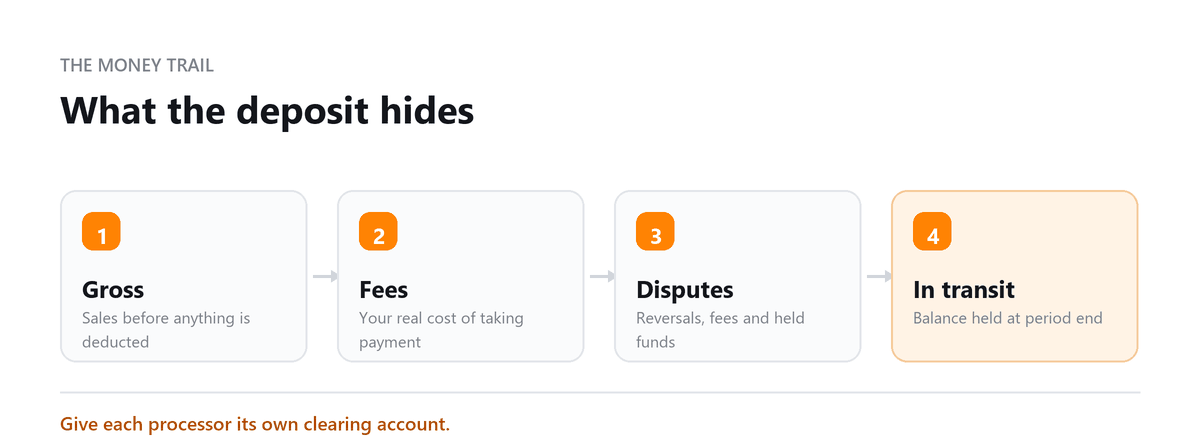
There's a third factor, which neither company would have you consider, but which has a huge impact on your day-to-day operations and cash flow: how much the money you make actually earns you when it hits your bank account. If you're processing payments through a company which pays you out as a batch, and then subtracts fees from the total, you will spend many hours each month reconciling the two.
This guide talks through the ways that Stripe and PayPal fundamentally differ, covers the costs to you once you get beyond the headline figures, and explains how each service behaves in practice.
Where Stripe earns its complexity is recurring revenue. If you're running subscriptions with plan changes, proration, trials and failed-payment recovery, Stripe Billing handles that natively and PayPal doesn't come close, you end up building the logic yourself or living with something cruder. For a business selling one-off products, that advantage is worth nothing, and PayPal's checkout familiarity is probably worth more.
Anu Gupta, CA, EA, B.Tech · LinkedInFee Comparison
- The thing to understand about PayPal pricing: there isn't one rate. Standard checkout, card payments through PayPal, invoicing and micropayments each price differently, and which applies depends on how the customer paid. Two merchants with identical volume can face different effective rates based purely on their customer mix. Work out your blended rate from an actual statement rather than from a published table: yours or anyone else's.
- On Stripe: the published rate is the published rate until you're at volume, at which point custom pricing is available and worth asking about. Most small merchants never ask.
| Fee Type | Stripe | PayPal |
|---|---|---|
| Standard Domestic (online) | 2.9% + 30¢ per transaction | 2.9% + 30¢ (PayPal Checkout standard) |
| International Transactions | 3.9% + currency conversion fee (~1.5%) | 4.4% + fixed fee by currency |
| Chargeback Fee | $15 (waived if you win the dispute) | $20 (waived if you win) |
| ACH/Bank Transfer | 0.8% capped at $5 | Free for PayPal balance; bank transfer fees vary |
| Monthly Fees | None for standard | None for standard (PayPal Pro: $30/month for advanced API) |
| Card-Present (in-person) | 2.7% + 5¢ (via Stripe Terminal) | 2.29% + 9¢ (via Zettle hardware) |
Feature Comparison
Two things get conflated on geography. Stripe's merchant availability, countries where you can operate a Stripe account is narrower than PayPal's. PayPal's consumer reach is enormous, meaning customers in far more countries can pay you. If you sell internationally to consumers, PayPal's reach is a genuine advantage even where Stripe is the better processor.
| Feature | Stripe | PayPal |
|---|---|---|
| Setup | Requires developer or technical knowledge for full implementation | Non-technical, set up in minutes without code |
| Customisation | Highly customisable via REST API, build any payment flow | Limited, pre-built checkout, PayPal button, minimal custom branding |
| Recurring Billing | Advanced, Stripe Billing with complex plan structures | Basic subscription tools, PayPal Subscriptions |
| Currency Support | 135+ currencies | 25 currencies |
| Fraud Protection | Radar (ML-based), highly configurable | Basic built-in fraud screening |
| Developer Tools | Extensive, webhooks, SDKs, detailed documentation | Limited, sufficient for standard integration |
| Invoicing | Stripe Invoicing, customisable, multi-payment methods | PayPal Invoicing, simple, PayPal-linked payment |
| Checkout Flow | Hosted or embedded, fully customisable | PayPal-branded checkout; limited white-labelling |
| Reporting | Detailed, real-time dashboard, custom exports | Basic, transaction history and simple reports |
| Global Reach | Available in 46+ countries | Available in 200+ countries (wider reach for consumer payments) |
Pros and Cons
| Stripe | PayPal | |
|---|---|---|
| Pros | Developer-friendly; highly customisable; 135+ currencies; advanced subscription management; better fraud tools | Consumer brand recognition, customers trust PayPal; easy setup; 200+ countries; no-code integration |
| Cons | Requires technical team; not ideal for non-technical owners; less consumer brand recognition at checkout | Limited customisation; higher international fees; 25 currencies only; checkout redirects can reduce conversions |
| Best For | SaaS platforms, marketplaces, tech companies, businesses with dev resources | Small businesses, freelancers, e-commerce sellers who need quick setup with trusted brand payment |
How each behaves in your books
The part that determines ongoing bookkeeping cost, and the part neither vendor discusses.
Payout timing. Both settle on a rolling schedule rather than per transaction, so a deposit in your bank represents a batch of sales rather than one. That's normal and manageable, provided you can pull the underlying detail.
Fee netting. Both deduct fees before depositing, which means the bank deposit never matches your gross sales. Your accounting has to record gross revenue and the processing fee as an expense, which requires the payout report not just the bank feed. Businesses that skip this understate both revenue and expenses, which distorts margin analysis and, in some cases, tax.
Refunds and partial refunds. These produce entries that need matching back to the original sale. Both platforms handle it; how cleanly it lands in your accounting depends on the integration.
Reconciliation quality. Stripe's reporting is more detailed and exports more cleanly, which matters at volume. PayPal's is workable but thinner, and multi-currency activity in PayPal is noticeably more work to reconcile.
Multi-currency. If you're settling in more than one currency, expect FX gains and losses that need recording. Neither platform does this for you and both produce the raw data.
Which to use - Stripe or paypal
Stripe if you have subscriptions with any complexity, you have development resources or an agency, you want a fully branded checkout, you sell internationally in many currencies, or you need real reporting depth.
PayPal if you're non-technical and want to take payments today, your customers value the familiarity of the PayPal button, you sell one-off products rather than subscriptions, or you're reaching consumers in markets where PayPal's coverage exceeds Stripe's.
Both, which is what a lot of businesses land on. Stripe as the primary processor handling subscriptions and custom checkout, with PayPal offered as an alternative at checkout because a meaningful share of customers prefer to pay that way. It costs nothing extra beyond the reconciliation of two payout streams.
Book a free consultation and we will get every processor tied out.
FAQs
Is Stripe or PayPal cheaper?
Headline domestic rates are close enough that it rarely decides anything. Real differences appear on international transactions, disputes, and at volume where Stripe offers custom pricing. The complication is that PayPal's effective rate depends on how your customers pay, so the only reliable comparison is your own blended rate from an actual statement.
Can I use both?
Yes, and many businesses do. A common setup runs Stripe as the main processor with PayPal available as a checkout option, because some customers simply prefer it and offering it reduces abandonment. The cost is reconciling two payout streams instead of one.
Which is better for subscriptions?
Stripe, clearly, once there's any complexity: plan changes, proration, trials, failed payment recovery. PayPal's subscription tools handle simple recurring charges adequately. If subscription revenue is your model, this is usually the deciding factor.
Do I need a merchant account with either?
No. Both bundle payment processing, which is why they're quick to start with and why the rate isn't separately negotiable at low volume. A traditional merchant account with interchange-plus pricing only becomes worth examining at substantial volume.
Will either hold my money?
Both can, and both do. Reserves and temporary holds are applied for volume changes, unusual transactions, dispute patterns and industry classification, and they affect new merchants disproportionately. Don't build cash flow assumptions on next-day payouts until you have a settled history.

Written by
Anu Gupta, CA, EA, B.Tech
Anu works with US businesses on tax and entity questions at Profitjets, from choosing a structure to the filings that follow it. She writes about the decisions owners make once and then live with for years. Connect on LinkedIn
Free consultation
Payments Not Reconciling?
Book a free consultation and we will get every processor tied out.