
TaxAct and TurboTax both file competent federal and state returns. The difference is guidance.
TurboTax walks you through an interview, double-checks your answers, and offers live assistance from a CPA if needed. TaxAct does the same, but has less hand-holding at a much lower price. For a simple return the output is the same, so the IRS won't be able to tell the difference.
Disclosure: I make a living preparing taxes, which presents with obvious incentive to encourage you to hire someone. Here is the truth of the matter; most simple returns don't require a professional. A W-2, standard deduction, and possibly interest income can be filed by you, and the money saved will be nice too. The section below in which I speak of when this isn't true is written with honesty to help you.
This guide will cover the cost both programs possess once state returns are added, where they differ, and the point at which tax software isn't the right answer.
First year of self-employment is the clearest trigger, because the software will file a technically correct return that misses half the deductions you were entitled to and sets your depreciation up in a way you'll live with for years. Software checks whether your return is valid. It doesn't tell you whether it's the best return you could have filed.
Anu Gupta, CA, EA, B.Tech · LinkedInPricing Comparison
| Plan | TaxAct (approx. 2025 filing season) | TurboTax (approx. 2025 filing season) |
|---|---|---|
| Free | Free federal + free state for simple returns | Free for simple returns (limited) |
| Basic/Deluxe | Deluxe ~$24.95 federal + ~$44.95 state | Deluxe ~$59 federal + ~$64 per state |
| Premier/Premium | Premier ~$34.95 federal | Premium ~$129 federal (investments, rental property) |
| Self-Employed | Self-Employed ~$64.95 federal + state | Self-Employed, ~$129 to $169 federal + state |
| Live CPA Access | Not available, phone support only | TurboTax Live Assisted, additional cost (varies) |
| Full CPA Prep | Not available | TurboTax Full Service, CPA files for you (varies by return complexity) |
Feature Comparison
| Feature | TaxAct | TurboTax |
|---|---|---|
| Ease of Use | Straightforward, functional interface, less hand-holding | Highly guided, step-by-step interview format; ideal for beginners |
| Forms Supported | All major federal and state forms | All major forms + more complex scenarios |
| Accuracy Checks | Standard accuracy review | Multiple accuracy checks, more comprehensive |
| Audit Support | Basic audit support, guidance and online resources | Audit Defence (add-on), full professional representation |
| Live Expert Access | Phone support during tax season | Live CPAs/EAs for questions; Full Service option for full preparation |
| Import from Prior Returns | Yes, from TaxAct prior year or PDF upload | Yes, from TurboTax prior year or PDF upload; W-2 photo import |
| Self-Employment Support | Deductions guidance for Schedule C | MaxDeductions for self-employed; industry-specific guidance |
| Investment Handling | Capital gains, 1099-B import | More detailed, crypto, options, complex securities |
Which Should You Use?
| Use TaxAct if… | Use TurboTax if… |
|---|---|
| You have a straightforward tax return (W-2, standard deduction) | You want maximum guidance and are unfamiliar with tax filing |
| Cost is the primary concern, TaxAct saves $30 to $100+ per return | You have complex taxes: self-employment, investments, rental property, foreign income |
| You are comfortable navigating tax software independently | You want access to live CPAs for questions or full professional preparation |
| You filed with TaxAct before and know the platform | Your audit risk is elevated and you want audit defence protection |
| Simple Schedule C or Schedule E with one or two items | You want the most comprehensive deduction-finding tools |
Where self-filed returns actually go wrong
This is the useful part, and it's what we see when clients bring us prior-year returns.
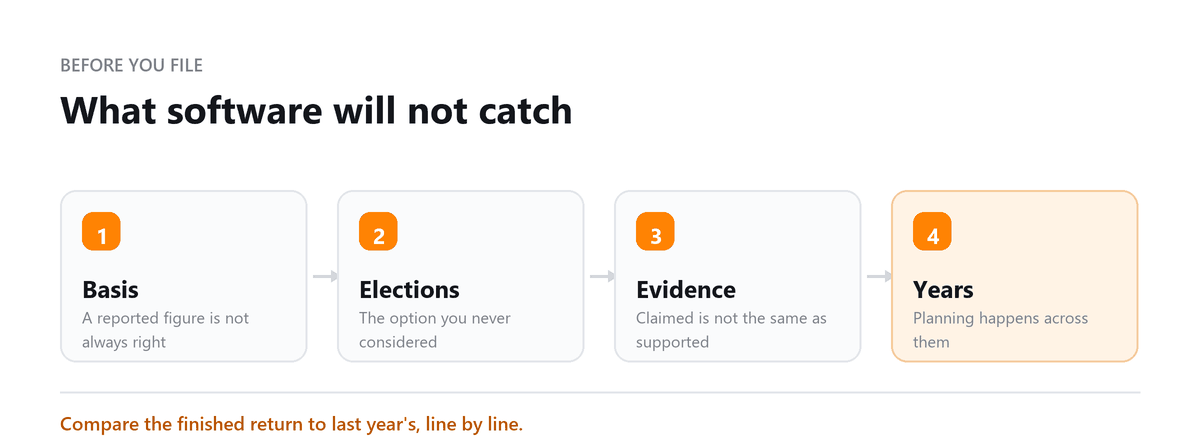
First-year self-employment. The return is usually valid and usually leaves money behind. Home office not claimed or claimed wrongly. Vehicle expense method chosen without comparing the two. Startup costs expensed when they should be amortised. Retirement contributions never considered, which is often the largest missed deduction available.
Depreciation set up badly. Software will accept a depreciation election that follows you for years. Correcting it later is more work than getting it right once.
Estimated payments never started. Software files the return; it doesn't tell you that you should have been paying quarterly through the year. The penalty and the unexpected balance both arrive together.
Missed S-Corp election. A profitable owner filing Schedule C who should have elected S-Corp status won't be told. The election has deadlines, and a missed year is a missed year.
Multi-state allocation. Living in one state and earning in another produces allocation questions software handles mechanically rather than thoughtfully.
Entity returns. An LLC taxed as a partnership or S-Corp needs a separate business return, and consumer software either doesn't handle it or handles it thinly.
When to stop using software
The test is whether the cost of a mistake exceeds what a preparer charges. Clear triggers:
- First year of self-employment or a new business
- An LLC taxed as a partnership or S-Corporation
- Income or residence across multiple states
- Rental property, particularly in its first year
- Significant investment activity, crypto, or a business sale
- Foreign income, foreign accounts, or a cross-border situation
- A major life event, marriage, divorce, inheritance, a death in the family
If none of those apply, file it yourself. A preparer adds little to a W-2 return with a standard deduction, and we'd tell you the same on a call.
On deductibility: the portion of a preparer's fee relating to your business income is deductible on Schedule C. The portion relating to your personal return generally isn't, since miscellaneous itemised deductions are currently suspended. Ask for the fee to be broken out if a meaningful share is business-related.
Book a free consultation and we will tell you if you still need software.
FAQs
Is TaxAct safe and reliable?
Yes. It's an IRS-authorised e-file provider that's been used by millions of filers for over two decades, with standard encryption and security. The difference from TurboTax is interface and support depth, not data security or filing accuracy.
When should I hire a CPA instead of using either?
When the cost of an error exceeds the preparer's fee. First year of self-employment, an entity return, multiple states, significant investments, foreign income, or a major life event are the common triggers. For a W-2 return with a standard deduction, software is the right answer and we'd say so.
Can I switch platforms between years?
Yes. Both import a prior-year return from a PDF regardless of what produced it, so you're not locked in. Keep your own copies of filed returns as PDFs anyway you'll want them for loan applications, and access to old returns inside a platform isn't guaranteed indefinitely.
Which finds more deductions?
TurboTax asks more questions, which surfaces more on a complex return. On a simple return there's nothing to find and both produce the same result. Neither finds what you don't tell it about, which is the underlying limit software prompts from a script, and a preparer asks because something in your situation looked unusual.
What if I've already filed and think I made a mistake?
Amend it. Form 1040-X exists for exactly this, and there's a window to claim a refund from an amended return generally three years from filing or two years from payment, whichever is later. Missed deductions from prior years are frequently recoverable; most people don't realise it and simply absorb the loss.

Written by
Anu Gupta, CA, EA, B.Tech
Anu works with US businesses on tax and entity questions at Profitjets, from choosing a structure to the filings that follow it. She writes about the decisions owners make once and then live with for years. Connect on LinkedIn
Free consultation
Return More Complicated This Year?
Book a free consultation and we will tell you if you still need software.