
Most of US small businesses are using QuickBooks without even thinking about alternatives. Their first accountant recommended it or it was familiar to them. Either way, its a reasonable choice and in many cases a sensible one. But that doesn't mean it's for everyone. Some of those businesses would be better off using something else.
Xero is a cloud-based accounting software developed for small and middle-market business. It is positioned against QuickBooks online and has some features that could appeal to those looking to use QB in a different way. QuickBooks has an obvious edge in the US market share and popularity with accountants, but Xero offers a lighter interface, easier collaboration, multilingual and multi-currency support and other features that might be valuable.
The more interesting question is if Xero would be a better fit for your particular situation and needs.
The businesses that get the most out of Xero usually have one of three things in common: more than one currency, several people who need to be in the books, or an accounting team working remotely.
When none of those apply and the business's CPA, payroll, and industry software all run through QuickBooks, switching to Xero means swimming against the current for very little gain. I'd rather a client stay on QuickBooks with clean books than move to Xero because it looks nicer. The software should match how the business works, not the other way round.
Ankit Sagatani, MBA, B.Com · LinkedInKey Features of Xero in 2026
| Feature | Description | Plan Required |
|---|---|---|
| Bank Feeds | Automatic daily import of transactions from connected bank and card accounts | All plans |
| Invoicing | Professional invoices with payment links, reminders, and reconciliation | All plans (Early: 20/month) |
| Bill Management | Supplier bills, payment tracking, due date management | All plans (Early: 5/month) |
| Bank Reconciliation | Match imported transactions to invoices, bills, spend money, and receive money | All plans |
| Financial Reports | P&L, Balance Sheet, Cash Flow, Aged Receivables/Payables, Budget Manager | All plans |
| Expense Claims | Employee expense submission, approval, and reimbursement workflow | Established plan |
| Projects | Time tracking, cost tracking, project profitability | Established plan |
| Multi-Currency | Invoice and pay in 160+ currencies; auto exchange rates | Established plan |
| Payroll (US) | Not built-in, via Gusto integration (US only) | N/A, Gusto add-on |
| 1,000+ Integrations | Connect to Stripe, Shopify, Gusto, Dext, HubSpot, and more | All plans |
| Unlimited Users | All plans include unlimited users, no per-seat charge | All plans |
Xero Pricing Plans in 2026.
| Plan | Price (US, approx.) | What's Included |
|---|---|---|
| Early | ~$25/month | 20 invoices, 5 bills per month; unlimited bank reconciliation; all core reports |
| Growing | ~$55/month | Unlimited invoices and bills; all core features; no multi-currency or projects |
| Established | ~$90/month | Everything in Growing + multi-currency, project tracking, expense claims, analytics |
Benefits of Using Xero for Small Businesses
| Benefit | Detail |
|---|---|
| Unlimited users, all plans | Owner + bookkeeper + CPA + office manager all access the same account simultaneously at no extra charge |
| Lower learning curve | Consistently rated more intuitive than QuickBooks, important for non-accountant business owners managing their own books |
| Always up to date | Cloud-based, no software updates to manage; new features roll out automatically |
| Real-time collaboration | Accountant and client see the same data simultaneously; reconciliation queries resolved in real time |
| Strong mobile app | iOS and Android, approve invoices, capture receipts, check cash position from anywhere |
When to Choose Xero vs QuickBooks
| Choose Xero if… | Choose QuickBooks Online if… |
|---|---|
| Multiple staff need simultaneous access, unlimited users saves money at scale | Your existing CPA or bookkeeper is QuickBooks-trained and unwilling to switch |
| You operate internationally or invoice in multiple currencies (Established plan) | You need integrated US payroll, QBO Payroll is more tightly integrated than Gusto-Xero |
| You prefer a cleaner interface and lower learning curve | You need built-in 1099 management and strong IRS tax support |
| You are based in UK, Australia, NZ, or another Xero-strong market | Your industry uses a QuickBooks integration (many US industry-specific tools connect only to QBO) |
| Your accountant is a Xero Partner or Certified Advisor | You want the widest US CPA ecosystem, QBO is the dominant US choice |
Profitjets has migrated more than 40 clients between QuickBooks and Xero, with clients typically reporting a 20 to 30% reduction in manual bookkeeping work after the transition. Multi-currency support and simpler collaboration across teams are among the most common reasons clients choose Xero.
We chose Xero over QuickBooks because we needed multi-currency accounting and wanted a simpler interface for our growing team. After Profitjets set everything up and cleaned up our existing records, we cut several hours of manual reconciliation each month and had fewer bookkeeping adjustments at month-end.
Who Xero Suits, and Who It Does Not
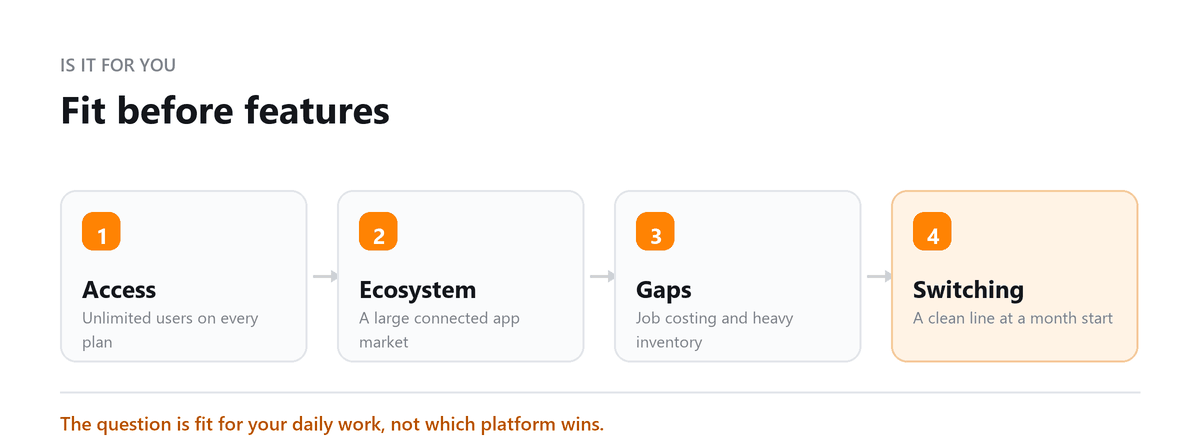
Xero fits businesses with straightforward transaction types, several people who need access, and an appetite for connecting other tools to the ledger. The unlimited user model in particular changes how teams work, because there is no cost reason to keep the bookkeeper, the office manager and the accountant looking at the same single login.
It suits less well where the accounting itself is unusual. Heavy manufacturing with work in progress, businesses that need detailed job costing natively, practices with complex multi-entity consolidation, and anyone whose industry runs on a specialist vertical package will find themselves either adding integrations or working around gaps.
The honest question is not which platform is better in the abstract. It is whether the three or four things your business does most often are things the platform handles natively, and whether the people who will use it every day are willing to work the way it expects.
Switching to Xero Part Way Through a Year
Mid-year switches are common and perfectly workable, but they need a clean line. Pick the first day of a month, close the old system to that date, and bring in opening balances rather than attempting to recreate transaction history.
- Agree the trial balance at the conversion date with whoever prepares your accounts, before anything is entered
- Bring open sales invoices and supplier bills across individually so ageing works from day one
- Import the fixed asset register with cost and accumulated depreciation, not just net book value
- Reconcile the bank in Xero from the conversion date forward and leave the earlier period reconciled in the old system
- Keep the old system accessible until the year is filed, since comparatives and queries will need it
The one thing not to do is run two ledgers in parallel indefinitely. It feels cautious and it produces two sets of books that disagree, which is worse than either one alone.
The Add-on Question
A large part of Xero's appeal is the ecosystem around it, and a large part of the trouble small businesses run into comes from the same place. Every connected app is another system holding a copy of your data, another subscription, and another thing to check when a number looks wrong.
The useful discipline is to add nothing until the manual version of the task has become genuinely painful, and to add one thing at a time so you can tell what changed. An app that saves two hours a month is not worth the integration risk if it also means a reconciliation now has to be traced through three systems.
Before connecting anything, check what it writes into the ledger and at what level of detail. Tools that post a single summary journal are easy to reconcile. Tools that push thousands of individual lines can make your ledger unreadable, and undoing that later is slow work.
Book a free consultation and we will tell you honestly if it fits.
FAQs
Is Xero suitable for freelancers and sole proprietors?
Yes. The entry plan covers invoicing, expense tracking, and bank reconciliation, which is what most freelancers need. Check the plan's limits on invoices and bills, since an active freelancer can outgrow them quickly. Some freelancers prefer simpler invoicing tools, but Xero suits anyone who wants proper double-entry books from the start.
Can I switch from QuickBooks to Xero?
Yes. Migration tools and accounting firms can move your chart of accounts, contacts, and balances, and often some transaction history. The cleanest time to switch is the start of a new fiscal year or quarter. Clean up your QuickBooks file before migrating, or the problems move with it.
Does Xero have payroll for US businesses?
Xero doesn't run US payroll itself. Most US businesses connect a provider such as Gusto, which runs payroll and posts journal entries back to Xero. Include that provider's fees when comparing total cost with QuickBooks.
Do US accountants work with Xero?
Many do, and the number keeps growing, but more US accountants work in QuickBooks. If you choose Xero, confirm your accountant or bookkeeper is comfortable in it, or work with a firm that uses it regularly.
How secure is financial data on Xero?
Xero encrypts data and supports multi-factor authentication, and it publishes its security practices on its website. The biggest risk is usually on the user side, so turn on multi-factor authentication for every user and remove access when staff or advisors leave.

Written by
Ankit Sagatani, MBA, B.Com
Ankit works with business owners across the US on industry-specific bookkeeping, from real estate to construction and retail. He writes about what each trade's books actually need. Connect on LinkedIn Connect on LinkedIn
Free consultation
Thinking About Xero?
Book a free consultation and we will tell you honestly if it fits.