
Small business owners have a receipt system, be it a folder in the glovebox, a stack on the desk, or a camera roll full of crumpled paper, shot in bad lighting. It works fine until tax season, when they have to match every card payment for the last year to a receipt that may barely be legible, missing, or buried in some disorganized pile.
Receipt management apps streamline the process by scanning the receipt at the time of purchase, saving them for later with the option to categorize and import into accounting software directly, so that they can finally be put away and forgotten.
Such programs have similar interfaces, and the differences are largely in what features they offer, how well they recognize text, whether they sync with accounting software, and if they offer team or solo plans to handle receipts and expenses.
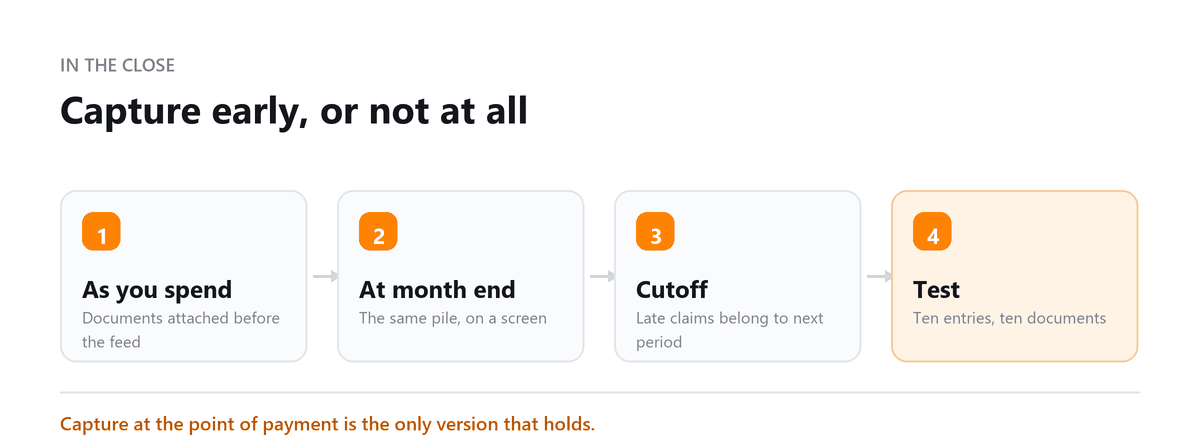
The receipt problem that creates the most year-end rework isn't lost paper. It's receipts that were captured but never matched. A client uses an app faithfully, but it isn't connected to the accounting software, so the bank feed brings in the same charge a second time.
By December there are hundreds of duplicate expenses or hundreds of card charges with no receipt attached, and someone has to reconcile both lists by hand. Whatever app you choose, connect it to your books on day one and make sure receipts attach to existing bank transactions instead of creating new ones.
Ankit Sagatani, MBA, B.Com · LinkedInWhy Receipt Management Matters
- Lost receipts = lost deductions, HMRC (UK) and IRS (US) require substantiation for business expense claims; a missing receipt can disallow the deduction
- Manual reconciliation is error-prone, matching paper receipts to card statements at month-end takes hours and introduces mistakes
- Digital records are audit-safe, a properly stored digital receipt is as valid as the original paper for tax purposes
- Real-time categorisation, capturing receipts immediately with category notes is faster and more accurate than reconstructing from memory weeks later
Top Receipt Management Apps in 2026
| App | Platform | Starting Price (approx.) | Best For |
|---|---|---|---|
| Expensify | iOS, Android, Web | Free (25 SmartScans/month); Control plan ~$20/user/month | Teams; corporate card users; approval workflows |
| Shoeboxed | iOS, Android, Web | From ~$18/month | High physical receipt volume; IRS-accepted digitisation; mail-in service |
| Dext Prepare (formerly Receipt Bank) | iOS, Android, Web | From ~$25/client/month (accountant plans) | Accountants managing client receipts; Xero/QBO integration |
| Wave Receipts | iOS, Android | Free (part of Wave Accounting) | Solopreneurs; Wave Accounting users |
| SAP Concur | iOS, Android, Web | Custom enterprise pricing | Mid-market and enterprise; travel + expense integration |
| Zoho Expense | iOS, Android, Web | Free (3 users); from ~$4/user/month paid | Zoho ecosystem users; multi-currency; team expense management |
How Receipt Management Apps Work
- Step 1: Capture, photograph receipt with mobile app camera; or forward email receipt to app's dedicated email address; or upload PDF/image via web
- Step 2: Extract, OCR (Optical Character Recognition) reads merchant name, transaction date, and amount from the image
- Step 3: Categorise, app suggests or auto-assigns expense category based on merchant or pre-set rules; user confirms or corrects
- Step 4: Sync, expense data pushed to accounting software (QBO, Xero) or HR/payroll system; receipt image attached to the transaction record
- Step 5: Report, expenses by category, period, or employee available in the app or in the connected accounting platform
Expensify vs Shoeboxed vs Zoho Expense
| Feature | Expensify | Shoeboxed | Zoho Expense |
|---|---|---|---|
| Receipt Capture | SmartScan (OCR); email forwarding; auto-import from connected cards | Mobile app + mail-in physical receipt scanning service | Mobile OCR; email; auto-import from Zoho CRM |
| Physical Mail-In | No | Yes, send receipts by post; Shoeboxed scans and processes them | No |
| Accounting Integration | QBO, Xero, NetSuite, Sage Intacct | QBO, Xero | Zoho Books (native); QBO, Xero (via integration) |
| Approval Workflow | Yes, multi-level approval chains | No, individual capture tool | Yes, approval workflow on paid plans |
| Free Plan | 25 SmartScans/month | No free plan (trial only) | Free for up to 3 users |
| Best For | Teams; corporate card programs | High-volume physical receipts; self-employed | Zoho ecosystem users; multi-currency SMBs |
Choosing the Right App
If you're a solo owner and your accounting software already includes receipt capture, start there. One system is easier than two. If you have a shoebox of paper to deal with, a mail-in service can clear the backlog before you move to mobile capture. Once employees are spending company money, you need an app with approvals, card imports, and per-person reporting.
Whichever you choose, test it on a month of real receipts before committing. Check how accurately it reads your typical receipts, and whether it matches them to existing bank transactions or creates duplicates.
We used to keep receipts in a mix of paper folders, email attachments, and phone photos, so by year-end we were always trying to track down missing documentation. After Profitjets connected a receipt-tracking app to our accounting system, receipts were captured as expenses came in, and we had far fewer missing receipts and a much easier year-end review.
Approximately 35% of new Profitjets bookkeeping clients have missing receipt documentation for at least some card transactions at onboarding, with QuickBooks-compatible receipt apps being the most commonly used solution once receipt capture is automated.
Book a free consultation and we will take the close off your desk.
FAQs
What is the best free receipt management app?
It depends on what you already use. Owners on Wave or Zoho should check the receipt features in those platforms first. Expensify and Zoho Expense have offered free tiers with limits. Once you need approvals, several users, or deeper accounting integrations, a paid plan is usually worth it.
How long should I keep business receipts?
Generally at least three years from the date you filed the return the expense relates to. The IRS can look back six years if income was substantially underreported. Records for bad debt deductions or worthless securities should be kept seven years, and employment tax records at least four. Records tied to property should be kept until the period for the year you sell it has passed.
Are digital receipts accepted by the IRS?
Yes. The IRS accepts electronic records, as long as they're accurate, legible, and can be produced if requested. A clear image stored in a receipt app or attached to the transaction in your accounting software meets that standard for most small businesses.
Do I need a receipt for every business expense?
You need records that support each deduction, including the amount, date, place, and business purpose. Travel, gifts, and vehicle expenses have stricter documentation rules. For other expenses, a bank or card statement plus a note on the business purpose may be enough in some cases. Keeping receipts is still the safest habit.
Should receipts go to the app or straight into my accounting software?
If your accounting software captures receipts well and you're the only person spending, sending them straight there keeps things simple. A separate app becomes useful when employees submit expenses, you need approvals, or you want better reading accuracy and reporting. In either case, make sure receipts attach to existing bank transactions.

Written by
Ankit Sagatani, MBA, B.Com
Ankit works with business owners across the US on industry-specific bookkeeping, from real estate to construction and retail. He writes about what each trade's books actually need. Connect on LinkedIn Connect on LinkedIn
Free consultation
Chasing Documents Every Month?
Book a free consultation and we will take the close off your desk.