
Unlike larger CPA firms that have the capacity to design a software stack, small practices typically cobble together a disparate set of tools to address busy seasons.
Their stack consisted of the tax software sold to the practice, the portal added when clients began complaining about the inability to view email attachments, and the tracker built in spreadsheets maintained by one partner. By the third year, the practice spends $6 on software tools and the staff often ask each other where a particular return is.
CPA software is a category of software used in CPA firms that cover the different systems used to carry out client work, including tax preparation, audit workpapers, practice management, client accounting, document exchange, and billing. The individual software tools are generally mature and dependable, and the CPA firms that benefit most from them are those that focus on how each tool serves the workstream (from engagement letter to e-file to billing).
This guide covers the different categories of CPA software, the most popular tools within each category, and how to think about building a stack based on the size and scope of your practice.
The software problem I see most in small firms isn't a bad tax program. It's that nothing connects. The engagement letter is in one system, documents come in through a portal nobody checks, status lives in a spreadsheet, and billing happens from memory in May.
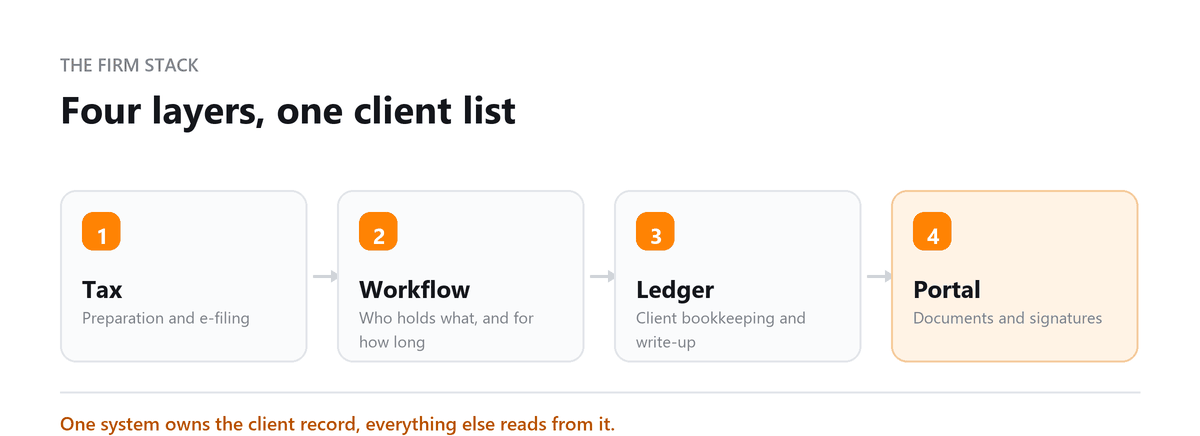
Every handoff between those tools is a place where a return stalls or an invoice never goes out. When we set up our own workflow, the rule was simple: every client engagement has one place where its status lives, and every other tool feeds that place. Choose practice management first, then fit the rest around it.
Ankit Sagatani, MBA, B.Com · LinkedInWhat is CPA Software?
CPA software covers several overlapping categories, practices typically need tools across multiple categories:
| Category | Purpose | Examples |
|---|---|---|
| Tax Preparation | Prepare, review, and e-file federal and state returns | TurboTax Professional, TaxAct Professional, Drake Tax, Lacerte, ProSeries, UltraTax CS |
| Practice Management | Client intake, workflow, task management, billing, time tracking | Canopy, TaxDome, Karbon, Jetpack Workflow |
| Audit & Assurance | Workpapers, engagement management, risk assessment | Wolters Kluwer CCH ProSystem fx Engagement, CaseWare |
| Client Accounting | Full-service bookkeeping for clients, often cloud-based | QuickBooks Online Accountant, Xero Practice Manager |
| Document Management | Secure client portal, e-signature, file storage | SmartVault, Sharefile, TaxDome's portal |
| Firm-Wide ERP | Practice management + billing + time + document in one platform | Thomson Reuters CS Professional Suite |
Core Features CPA Software Should Have
- Client management, centralised database of client profiles, contacts, and entity types
- Tax preparation, federal and state form support, e-file, auto-calc from prior year
- Workpapers and engagement management, organised audit trail and sign-off workflow
- Time tracking and billing, billable hours capture, WIP reporting, invoicing
- Client portal, secure document upload, download, and e-signature
- Workflow automation, recurring task templates, deadline reminders, review queues
- Reporting and analytics, firm productivity, realization rates, client profitability
Best CPA Software by Category
| Software | Category | Best For | Pricing |
|---|---|---|---|
| Drake Tax | Tax Preparation | Small-to-mid CPA practices; all-inclusive annual fee | ~$1,795/year (unlimited e-filing) |
| Lacerte (Intuit) | Tax Preparation | Complex returns; large practices | Pay-per-return or firm packages, contact Intuit for pricing |
| CCH ProSystem fx Engagement | Audit & Assurance | Mid-to-large audit practices | Custom enterprise pricing, contact Wolters Kluwer |
| TaxDome | Practice Management + Portal | All-in-one for small practices; excellent client UX | ~$50/month per user |
| Canopy | Practice Management | Growing practices; clean workflow and task management | ~$50 to $75/month per user |
| QuickBooks Online Accountant | Client Accounting | Practices managing client QBO books; free for the firm | Free for accountants; clients pay their own QBO subscription |
| Xero Practice Manager | Client Accounting | Xero-aligned practices; strong in UK/ANZ markets | Included with Xero Partner Programme |
How to Choose CPA Software
| Practice Type | Recommended Stack |
|---|---|
| Solo CPA or very small practice | Drake Tax (preparation) + TaxDome (practice management + portal) + QuickBooks Online Accountant (client work) |
| Small firm (2 to 10 CPAs) | Lacerte or ProSeries (tax) + Canopy or Karbon (practice management) + QuickBooks Online Accountant or Xero |
| Mid-size firm (10 to 50 CPAs) | UltraTax CS or CCH Axcess Tax + Thomson Reuters CS suite (practice mgmt) + client accounting platform |
| Audit-focused firm | CCH ProSystem fx Engagement or CaseWare (workpapers) + practice management + tax |
Building a Stack That Scales for your Business
Start with how work moves through the firm, not with a feature list. Map a typical engagement from intake to invoice and mark every point where information is typed in twice, emailed, or tracked outside a system. Those points show which tools you actually need and which integrations matter most.
For most small firms, practice management is the anchor. Once every engagement has a status, owner, and deadline in one place, adding tax, document, and billing tools becomes a question of how well they connect. Before buying anything new, check whether a tool you already pay for covers the need. Many firms are paying for overlapping portals and workflow features without realising it.
Software also has limits. When bookkeeping clients' files arrive unreconciled every March, better tax software won't fix that. Some firms solve it by outsourcing monthly bookkeeping, so returns start from clean books.
During tax season, our team was spending too much time cleaning up bookkeeping issues before we could even start working through returns. Once Profitjets took over the recurring bookkeeping and kept the books reconciled throughout the year, our staff spent much less time on cleanup and could focus on tax preparation and client work instead.
Profitjets supports approximately 25 CPA and accounting firms with outsourced bookkeeping, covering recurring bookkeeping, account reconciliations, month-end close, and year-end cleanup.
Book a free consultation and we will map the joins before you buy.
FAQs
What tax software do most small CPA firms use?
Small firms commonly use Drake Tax, ProSeries, Lacerte, ProConnect, UltraTax CS, or CCH Axcess Tax, depending on their return mix and budget. Drake is often chosen for predictable pricing, and Lacerte and UltraTax for complex returns. The best fit depends on the forms you file most, how you want to pay, and which other tools you use.
Does a small CPA practice need practice management software?
In most cases, yes. Even a solo practice juggles hundreds of deadlines, document requests, and follow-ups each season. Practice management software keeps work from slipping, automates client reminders, and makes billing more consistent. Many firms see the benefit within their first busy season.
Should a CPA firm use an all-in-one platform or separate tools?
All-in-one platforms are simpler to learn and cheaper to connect, which suits many small firms. Separate tools can be stronger in individual areas, such as complex tax preparation or audit workpapers. That's often worth it for larger firms or specialised work. Whichever you choose, make sure data moves between systems without re-entry.
When should a firm switch tax software?
Plan the switch after the busy season ends and give staff time to train before the next one. Common reasons to switch include pricing that no longer fits your return volume, weak state or form coverage, or poor integration with the rest of your stack. Test the new software on a few prior-year returns before committing.
Can outsourcing bookkeeping reduce a CPA firm's software needs?
It can reduce the workload that software is trying to manage. When a dedicated team handles clients' monthly bookkeeping in QuickBooks or Xero, the firm receives reconciled books at year-end instead of building them during tax season. The firm still needs tax and practice management tools, but spends far less time on cleanup inside them.

Written by
Ankit Sagatani, MBA, B.Com
Ankit works with business owners across the US on industry-specific bookkeeping, from real estate to construction and retail. He writes about what each trade's books actually need. Connect on LinkedIn Connect on LinkedIn
Free consultation
Rebuilding Your Firm Stack?
Book a free consultation and we will map the joins before you buy.