
A business owner with a single receipt app is a tidy bunch. A bookkeeper with thirty clients? Those thirty clients are using thirty different systems for receipt capture and management. One texts photos of each receipt, one gets a monthly email, and one has a shoebox full of paper receipts that they drop off at the office in March. Capturing receipts for one individual is one thing. Capturing receipts for multiple clients, or multiple employees, is something else entirely.
The tools designed to handle this kind of multi-organization bookkeeping have some similarities to the receipt apps we've described, but approach the problem from a different angle.
They offer to extract receipts and bills from email, supplier portals, and bank feeds, and apply supplier-specific rules before publishing the resulting documents to a specific client's QuickBooks or Xero account, with no typing required from the bookkeeper.
The receipt problem that costs the most at year-end isn't one client losing a receipt. It's a bookkeeping team with no single intake process. Documents arrive by text, email, shared drive, and paper, and each one gets handled differently depending on who picks it up.
Some get entered twice, some never get attached, and supplier bills get coded differently from one month to the next. We fixed it by giving every client one place to send documents and one set of supplier rules. Once intake is consistent, the choice of software becomes almost secondary.
Ankit Sagatani, MBA, B.Com · LinkedInThis article will cover the tools used for receipt and document capture by accountants, bookkeepers, and finance professionals, and how they compare.
Best Receipt Management Apps in 2026
| App | Best For | Key Features | Approx. Pricing |
|---|---|---|---|
| Dext Prepare (formerly Receipt Bank) | Accountants and their clients; Xero and QBO users | OCR receipt capture, auto-categorisation, accounting integration, supplier rules | From ~$25/month per client (varies by plan/volume) |
| Expensify | Teams with approval workflows; corporate card users | SmartScan OCR, receipt-to-expense matching, multi-level approval, corporate card | From ~$20/user/month (Control plan); free for light use |
| Hubdoc | Xero and QBO users; cloud document collection | Auto-fetch bank statements, bills, and receipts from web portals; sync to Xero/QBO | Free for Xero subscribers (via Xero's acquisition); $12/month standalone |
| AutoEntry (now Basecone) | Bookkeepers managing multiple clients | High-volume OCR processing; batch upload; multi-currency | Typically per-credit pricing, verify at basecone.com |
| Wave Receipts | Solopreneurs and freelancers on Wave Accounting | Free receipt capture; sync to Wave Accounting | Free (part of Wave platform) |
| Shoeboxed | Small businesses with lots of physical receipts | Mail-in physical receipt scanning service; also mobile app; IRS-accepted digital copies | From ~$18/month |
What to Look For in a Receipt Management App
| Feature | Why It Matters |
|---|---|
| OCR accuracy | Optical character recognition that correctly reads merchant name, date, and amount, poor OCR creates more manual work than it saves |
| Accounting integration | Direct sync to QuickBooks, Xero, or your accounting platform, eliminates manual re-entry |
| Supplier rules | Automatically categorise receipts from known suppliers (e.g. always categorise Amazon receipts as 'Office Supplies'), saves repetitive manual categorisation |
| Mobile app quality | iOS/Android receipt capture on the go, the camera and processing speed matters |
| Multi-currency | Required for international travel expense receipts |
| Audit trail | Timestamp, GPS (if available), and image of original receipt stored alongside the digital record, important for tax authority review |
| Bulk upload | Ability to upload multiple receipts simultaneously, critical for backlog processing |
Dext Prepare vs Hubdoc vs Expensify
| Dimension | Dext Prepare | Hubdoc | Expensify |
|---|---|---|---|
| Primary User | Accountant/bookkeeper managing clients | Accountant/bookkeeper managing clients | Business owner or finance team |
| Receipt Capture | Email, mobile app, web upload | Mobile app, web upload, auto-fetch from portals | Mobile app (SmartScan), email, credit card auto-import |
| Auto-Fetch | Yes, can auto-fetch from some supplier portals | Yes, strong auto-fetch from bank/utility portals | Limited |
| Accounting Integration | Xero, QBO, Sage Intacct, NetSuite | Xero (native), QBO | QBO, Xero, NetSuite, Sage Intacct |
| Multi-Client | Yes, built for accountants managing many clients | Yes, built for accountants | No, single-organisation focus |
| Pricing | Per client / volume-based | Free for Xero subscribers | Per user / usage-based |
| Best For | Bookkeepers handling client receipt streams | Xero-aligned practices wanting free integrated capture | Businesses with employee expense workflows |
Setting Up a Capture Process That Works
Decide on one intake route for each client or team: a dedicated email address, the mobile app, or a shared upload folder that feeds the capture tool. Tell clients exactly where documents go and stop accepting them anywhere else. Consistency matters more than which channel you pick.
Next, build supplier rules for recurring vendors before the backlog comes in. Rules for categories, tax treatment, and payment method mean most documents publish without review. Finally, decide whether documents create new transactions or match existing bank feed entries, and apply that rule to every client. That's where most duplicate entries come from.
Before Profitjets helped us set up a proper capture process, bills and receipts were scattered across email threads, text messages, paper folders, and whoever happened to receive them. By month-end, we had a backlog of documents to chase down and match to transactions. Once everything started going through one capture process, our team knew where to send documents and our bookkeeping no longer depended on finding receipts at the last minute.
What a Receipt Has to Show to Support a Deduction
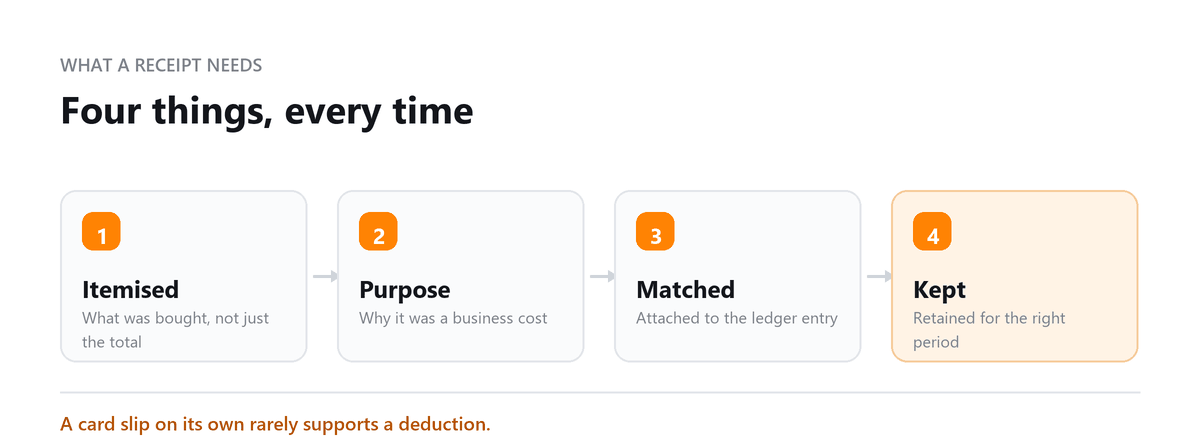
A photograph of a card slip is often not enough on its own. What supports a business deduction is evidence of what was bought, from whom, when, for how much and why it was a business cost, and a card slip usually carries only some of that.
The gap matters most for the categories that attract attention: meals, travel, entertainment and anything with a plausible personal use. For those, the business purpose and the people involved are part of the record, not an optional extra, and an app that lets you add a note at the moment of capture is worth more than one with better image processing.
- Keep the itemised receipt rather than only the card slip, since the itemisation is what shows what was actually bought
- Record the business purpose while you still remember it, not at year end
- For travel, keep the itinerary alongside the payment, because the two together tell the whole story
- Match the receipt to the transaction in the ledger, since an unattached receipt proves very little
Check the current IRS guidance on substantiation for the categories that apply to you, since the requirements differ by expense type.
Building a Capture Habit That Survives a Busy Week
Every receipt system fails the same way. It works for a month, then a busy period arrives, receipts pile up, and catching up feels large enough to keep postponing. The design goal is therefore not completeness but a habit that costs almost nothing on a bad day.
Capture at the point of payment is the only version that holds. The receipt is in your hand, the purpose is in your head, and the whole action takes seconds. Anything that requires sorting a pile later will eventually not happen.
Automate everything that can be automated so the manual effort is reserved for paper. Supplier invoices that arrive by email should be forwarded automatically to the capture address rather than handled by a person. Recurring subscriptions should be set up once with the documentation attached. What is left is the genuinely physical receipts, and that is a small enough pile to keep up with.
Retention: How Long to Keep What
Digital copies are acceptable as records, which removes the argument for keeping boxes of fading paper. It does not remove the need to keep them for as long as they may be needed, and the periods differ by document type rather than being one number.
Ordinary supporting records for a filed return are kept for a period tied to how long that return can be examined or amended. Records relating to property are different, because they support the basis of an asset and stay relevant until the asset is disposed of and that year's return is itself out of period. Payroll and employment records carry their own requirements, as do records supporting any carried-forward position.
Check the current IRS record retention guidance for the specific categories in your business, and set the retention on your storage accordingly. The practical advice is to keep the underlying documents organised by tax year and to resist deleting anything relating to property or to a loss carried forward, since those are the ones people most often need long after they expected to.
Book a free consultation and we will get the capture running properly.
FAQs
What happened to Receipt Bank?
Receipt Bank rebranded as Dext in 2021. The product and its core features carried on under the new name. Anyone looking for Receipt Bank will find the same tool at Dext.
Is Hubdoc free with Xero?
Hubdoc is owned by Xero and has been included with Xero subscriptions. That makes it an easy choice for Xero users and firms. It can also publish to QuickBooks Online.
Are digital receipts accepted by the IRS?
Yes. The IRS accepts electronic copies of receipts, as long as the storage system produces accurate, legible, retrievable records. A clear image captured by a receipt tool and stored with the transaction meets that standard for most small businesses. Keep the originals until you're confident the digital copies are complete and readable.
What's the difference between receipt capture and expense management?
Receipt capture reads documents and publishes them into the accounting system. Expense management adds the steps around employee spending: submitting expenses, getting approval, reimbursing, and enforcing spending policies. Firms handling client bookkeeping usually need capture. Companies with employees spending money usually need both.
How should a bookkeeper handle a client's receipt backlog?
Scan or bulk-upload the backlog into the capture tool, let supplier rules code what they can, and review the rest in batches by supplier or month. Match documents to existing bank feed transactions instead of creating new ones, so nothing gets recorded twice. Once the backlog is cleared, switch the client to a single ongoing intake route.

Written by
Ankit Sagatani, MBA, B.Com
Ankit works with business owners across the US on industry-specific bookkeeping, from real estate to construction and retail. He writes about what each trade's books actually need. Connect on LinkedIn Connect on LinkedIn
Free consultation
Receipts in a Shoebox?
Book a free consultation and we will get the capture running properly.