
Small business owners tend to approach accounting software the same way they do when choosing between different cell phone plans. They take the cost into account, and the cheapest option that covers their needs gets them a green light.
The fee, however, is rarely the reason you pay more for one accounting application over the others. It can be found in the details: if your bookkeeper cannot understand the interface, if you are unable to transfer your payroll information seamlessly or, when the time comes you have to re-enter years’ worth of data because your growth path does not match the initial plan
The accounting software is the tool that lets you record income and expenses, reconcile payments, send out invoices to clients/debtors and track what is owed to you, as well as prepare financial statements. These days most solutions are cloud-based and can access the transactions directly from your bank account.
They all provide similar features, and the three biggest deciding factors are the target audience, compatible software, and projected growth.
This guide will discuss the five most common options for small businesses in the Unites States and help you find the one that suits your needs.
Top Accounting Software for Small Businesses
| Software | Best For | Starting Price (approx. 2026) | Free Plan? |
|---|---|---|---|
| QuickBooks Online | US small businesses; widest CPA/bookkeeper support | ~$38/month (Simple Start) | No (30-day trial) |
| Xero | Multi-user businesses; international operations; clean UX | ~$25/month (Early plan, 20 invoices/5 bills limit) | No (30-day trial) |
| FreshBooks | Freelancers; service businesses; time tracking | ~$17/month (Lite, 5 clients) | No (30-day trial) |
| Wave | Solopreneurs; very small businesses; budget-constrained | Free (core features); Wave Pro ~$16/month | Yes, invoicing, expense tracking, basic reports |
| Zoho Books | Growing SMBs; Zoho ecosystem users | ~$15/month (Standard) | Free for businesses under $50K revenue |
NOTE: Prices above are approximate standard (non-promotional) rates. All five platforms offer introductory promotional discounts (typically 50% off for 3 months). Do not use promotional prices as the reference price in this article, use the standard monthly rate.
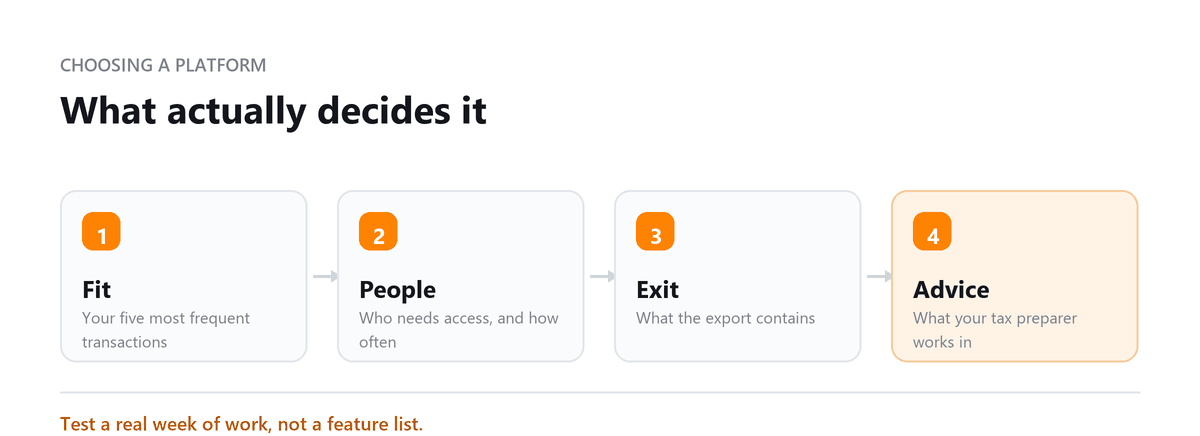
The selection mistake I see most is choosing software without asking who else will work in it. An owner picks a tool because it's cheap or looks simple, then hires a bookkeeper who doesn't use it, a CPA who needs exports every quarter, and a payroll provider that doesn't sync.
Now the business pays for software, workarounds, and extra hours from every professional involved. Before comparing prices, write down everyone who'll touch your books and every system that has to connect. That list usually narrows the choice to one or two options on its own.
Ankit Sagatani, MBA, B.Com · LinkedInWhat is Accounting Software?
Accounting software automates the core tasks of business financial management: recording income and expenses, reconciling bank statements, generating invoices, tracking accounts payable and receivable, processing payroll, and producing financial statements (P&L, Balance Sheet, Cash Flow). Modern cloud-based accounting software connects directly to bank accounts via live bank feeds, eliminating manual transaction entry.
Types of Accounting Software
| Type | Description | Best For |
|---|---|---|
| Cloud-Based | Browser-based; accessible anywhere; automatic updates; subscription pricing | Most small businesses, lowest IT overhead |
| Desktop | Installed locally; works offline; one-time or annual licence | Businesses with specific offline or data-control requirements (QuickBooks Desktop, Sage 50) |
| Industry-Specific | Built for a specific sector (property management, construction, restaurants) | Businesses where general software lacks critical features (AppFolio for property, Restaurant365 for food service) |
| Open-Source | Customisable source code; typically free to download | Technical teams willing to self-host and configure (GnuCash, Manager) |
Core Features to Look For
- Bank feeds, automatic import and categorisation of bank/credit card transactions
- Invoicing, professional invoice creation with payment links and automated reminders
- Expense tracking, receipt capture, categorisation, employee expense management
- Financial reports, P&L, Balance Sheet, Cash Flow Statement, aged receivables/payables
- Bank reconciliation, match transactions to bank statement with audit trail
- Payroll, built-in or via integration (QuickBooks Payroll, Gusto, ADP)
- Tax support, sales tax calculation, 1099 filing, accountant access
- Mobile app, iOS and Android for receipt capture and on-the-go financial tracking
- Integrations, connect to your CRM, e-commerce platform, payroll, and industry tools
How to Choose the Right Software
| If you… | Choose… |
|---|---|
| Are a US-based business and want your CPA or bookkeeper to access your books remotely | QuickBooks Online, dominant US market share; most accounting professionals are trained on it |
| Have multiple staff or clients accessing the accounts and want unlimited users | Xero, unlimited users on all plans; QBO charges per additional user |
| Are a freelancer or service business and need excellent invoicing + time tracking | FreshBooks, the strongest invoicing tool in its class for non-accountants |
| Are a solopreneur with simple needs and a tight budget | Wave, genuinely free for core accounting; no monthly fee for invoicing and basic reports |
| Are growing fast and want to integrate with a broader business software stack | Zoho Books, part of the Zoho ecosystem (CRM, HR, Inventory) with a free tier under $50K revenue |
Choosing for Where the Business Is Going
Pick software for the business you expect to have in two or three years, not only for this month. A solo freelancer who plans to hire employees, sell online, or bring on a bookkeeper will outgrow a basic tool faster than expected. Migrating mid-year means cleanup, re-connecting apps, and often paying an accountant to rebuild parts of the history.
A simple test works well. List everyone who'll need access to the books, every system that must connect, and any features you'll need within two years, such as payroll, inventory, multiple currencies, or department reporting. Choose the lowest-cost option that covers the whole list. Then confirm your accountant is comfortable working in it before you sign up.
Our original accounting software worked when the business was smaller, but as we grew, our bookkeeper struggled with it and several of our integrations stopped working reliably. After switching to a better-fit platform with Profitjets, our systems connected properly, our bookkeeping became easier to manage, and month-end reporting no longer required so much manual work.
QuickBooks Online is the most common accounting platform among Profitjets clients, followed by Xero. Approximately 20% of new clients change accounting software within their first year with Profitjets after determining that their existing platform no longer fits their reporting, integration, or workflow needs.
Book a free consultation and we will set up the one that suits your books.
FAQs
What accounting software do most US small businesses use?
QuickBooks Online is the most widely used option among US small businesses and the platform most US accountants know best. Xero is its main competitor, especially among businesses with outsourced accounting or international activity. Popularity is a useful signal, but fit matters more.
Is free accounting software reliable?
For simple needs, yes. Free tools such as Wave use proper double-entry accounting and handle basic invoicing and expense tracking. They usually make money through payment processing fees, payroll, or paid add-ons. Once you have employees, inventory, or more complex reporting needs, a paid platform is usually worth it.
Can I switch accounting software later?
Yes, but it takes work. Balances, contacts, and some history can usually be migrated, but integrations have to be reconnected and reports often need rebuilding. The cleanest time to switch is the start of a new fiscal year or quarter, after the old books are reconciled.
Do I still need a bookkeeper if I use accounting software?
Software automates data entry. It doesn't replace the judgement needed to categorise transactions correctly, reconcile accounts, record accruals, and catch errors. Many owners handle this themselves at first. As transaction volume grows, a bookkeeper usually saves more than they cost.
Should I choose desktop or cloud software?
For most small businesses, cloud software is the better fit. It works from anywhere, updates automatically, and lets your accountant work in the same file. Desktop software is mainly for businesses with specific offline, data-control, or industry requirements. Check each vendor's current desktop availability before committing.

Written by
Ankit Sagatani, MBA, B.Com
Ankit works with business owners across the US on industry-specific bookkeeping, from real estate to construction and retail. He writes about what each trade's books actually need. Connect on LinkedIn Connect on LinkedIn
Free consultation
Not Sure Which Platform Fits?
Book a free consultation and we will set up the one that suits your books.